How to Redeem Swiggy Instamart E-Gift Card: Step-by-Step Guide.

If you have ever run out of groceries late at night or needed household essentials delivered in minutes, you already know how useful Swiggy Instamart is. This quick-commerce platform has changed the way people in India shop for everyday needs, offering delivery in as little as 10 minutes. From fresh vegetables and dairy products to snacks and personal care items, Swiggy Instamart covers it all. Now imagine making that experience even smoother with a Swiggy Instamart E-Gift Card. Just redeem your gift card and shop away. If you have one sitting in your inbox and are wondering how to use it, this guide walks you through the entire Swiggy Instamart gift card redemption process in simple steps.

What is a Swiggy Instamart E-Gift Card?

A Swiggy Instamart E-Gift Card is a prepaid digital voucher that can be used to pay for your orders on Swiggy Instamart. It works like a digital wallet credit, loaded with a fixed amount that gets deducted when you shop. You might receive one as a birthday gift, a festive present, or simply buy one for yourself to manage your grocery budget better. Either way, the card is easy to use, does not require any physical form, and is perfect for everyday shopping needs. It is one of the most practical gifting options available today, especially for people who rely on Instamart regularly.

How to Redeem Swiggy Instamart E-Gift Card: Step-by-Step Guide.

The process of how to redeem a Swiggy gift card is quick and takes less than a minute. Follow these steps carefully.

Step 1: Log In to the Swiggy App and Tap on the Profile Icon.
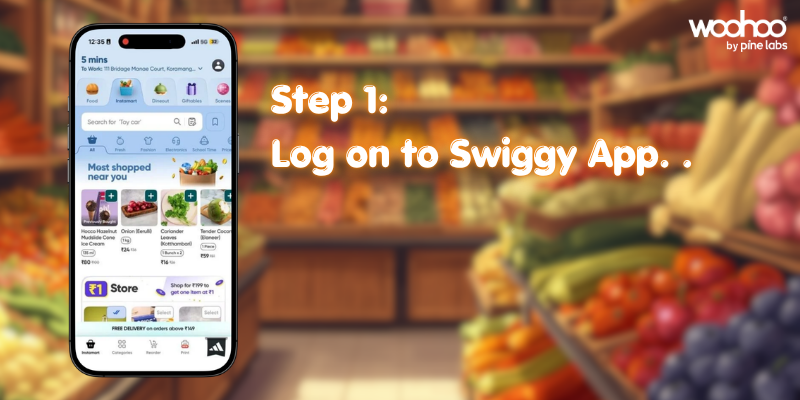
Open the Swiggy app on your smartphone and log into your account. Once you are on the home screen, look for the profile icon located in the top left corner of the app and tap on it to open your account menu. If you do not have the app, download it from the Google Play Store or Apple App Store.

Step 2: Tap on “Swiggy Money”.
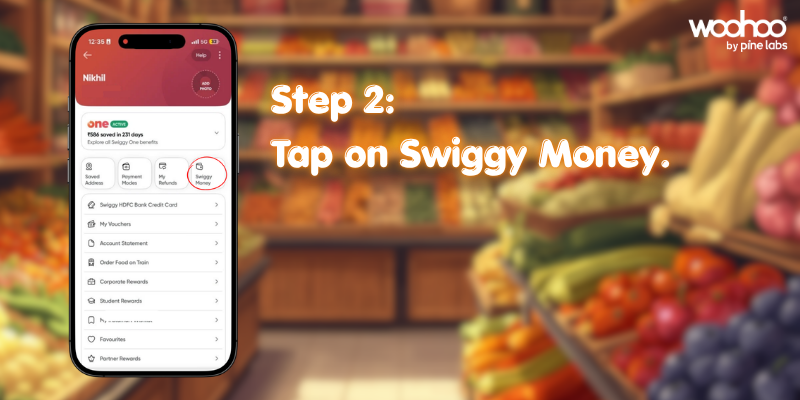
Inside your account section, you will find an option called “Swiggy Money.” This is the digital wallet feature within the Swiggy platform. Tap on it to proceed.

Step 3: Tap on “Redeem Now”.
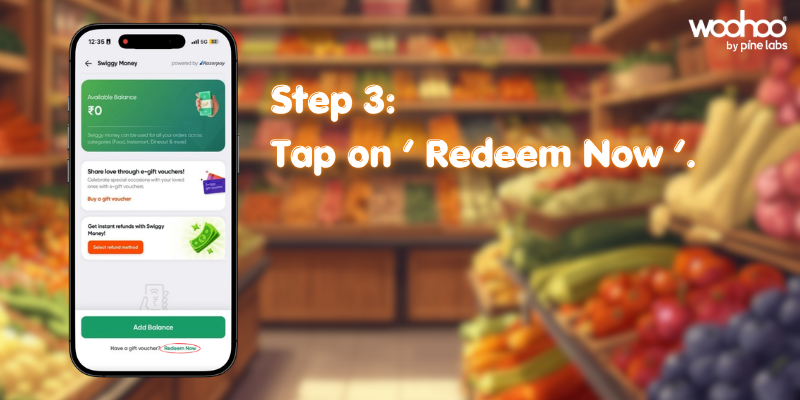
After entering the Swiggy Money section, you will see an option that says “Redeem Now.” Tap on it to begin the Swiggy Instamart e gift card steps.

Step 4: Enter Your Gift Card Number and PIN.
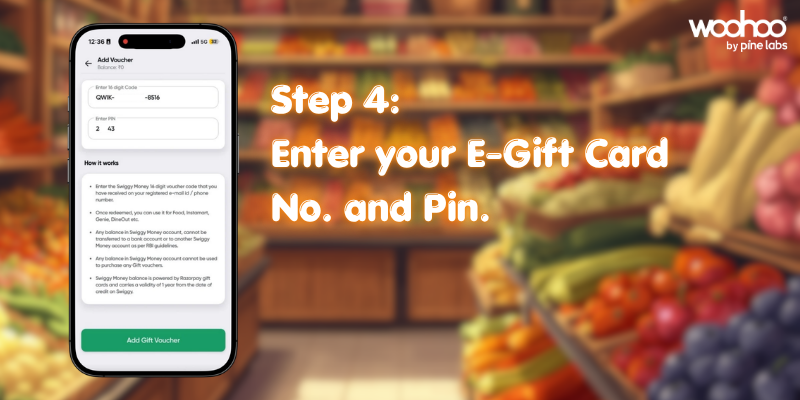
You will be prompted to enter your gift card number and PIN. These details are usually shared in the email or message you received along with the gift card. Enter them carefully and confirm.
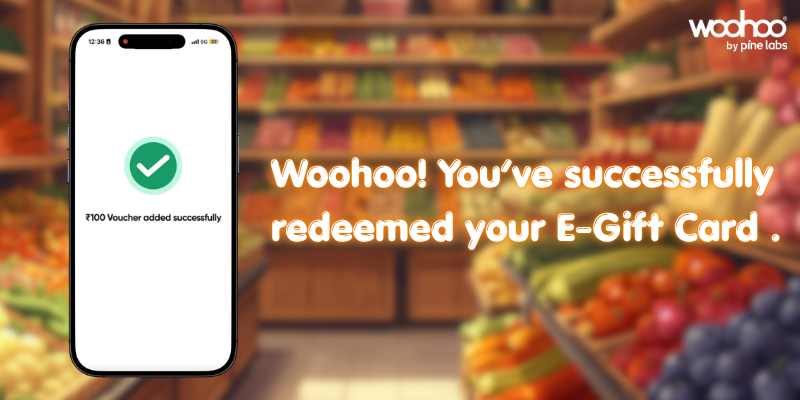
Woohoo! You have successfully redeemed your Swiggy Instamart E-Gift Card. The balance will now reflect in your Swiggy Money wallet and will be applied automatically to your next Instamart order.

Benefits of Using a Swiggy Instamart Gift Card.

  • Convenience at Its Best: There is no need to fumble with cash or saved card details during checkout. Once your Swiggy Instamart gift card is redeemed, the balance is right there in your wallet, ready to use whenever you order.
  • Save More with Ongoing Offers: Swiggy Gift card can be clubbed with ongoing swiggy offers and deals available on the app. That means every rupee on your card stretches further, giving you extra savings on top of whatever promotions are already running on Swiggy Instamart.
  • Perfect for Gifting: Looking for a last-minute gift that is actually useful? A Swiggy Instamart gift card is thoughtful, practical, and suitable for almost anyone. Whether it is for a friend, a family member, or a colleague, it is a gift they will genuinely appreciate.
  • Instant Redemption: The entire process of Swiggy Instamart gift card redemption takes under a minute. There is no waiting period, no verification delays. Your balance is available immediately after you redeem the card.

Frequently Asked Questions.

  1. Where can I use the Swiggy Instamart gift card?
    Ans. The gift card is valid for purchases on Swiggy Instamart through the Swiggy app. It can be used to pay for groceries, household essentials, personal care products, and more.
  2. Can the gift card be used partially?
    Ans. Yes. If your order amount is less than the gift card value, the remaining balance stays in your Swiggy Money wallet and can be used for future orders.
  3. What is the validity of a Swiggy Instamart E-Gift Card?
    Ans. The gift card is valid till 14th May 2026. Make sure to redeem and use the balance before the expiry date.
  4. Can it be combined with other offers or promo codes?
    Ans. Yes, the Swiggy Instamart gift card can be clubbed with ongoing offers available on the app, helping you save even more on every order.
  5. What happens if the gift card balance is not fully used?
    Ans. The unused balance remains in your Swiggy Money wallet until it is spent or until the card expires. You do not lose it after a single order.
  6. Is the gift card refundable?
    Ans. Swiggy Instamart gift cards are generally non-refundable and cannot be exchanged for cash. Once redeemed, the balance can only be used within the platform.

Exclusive Offer: Flat 10% Off on Swiggy Instamart Gift Cards.

Here is something that makes this deal even better. Woohoo is currently offering a flat 10% discount on Swiggy Instamart gift cards. That means every time you buy a Swiggy Instamart gift card through Woohoo, you are already saving before you even start shopping. Think about it. You save 10% on the card, and then use it to buy groceries and daily essentials at regular prices. It is a simple and smart way to cut down on your monthly household expenses without changing your shopping habits. Do not miss this offer. Grab your discounted Swiggy Instamart gift card today and start saving right away.

Start Saving on Every Grocery Order.

Swiggy Instamart has made grocery shopping faster and more convenient than ever. And with an E-Gift Card, the experience becomes even simpler. From the moment you receive the card to the point where your groceries arrive at your door, everything is designed to be quick and hassle-free. Whether you are new to gift cards or just needed a refresher on the Swiggy Instamart gift card redemption process, this guide has you covered. The steps are straightforward, the benefits are real, and with Woohoo’s flat 10% off offer, the savings start before you even place your first order. Grab your Swiggy Instamart E-Gift Card today and make every grocery run a little more rewarding.

FacebooktwitterlinkedinFacebooktwitterlinkedin

How to Redeem Your Zepto Gift Card: Step‑by‑Step Guide.

Zepto has transformed the way we shop for groceries and essentials. With lightning‑fast deliveries, fresh produce, and a seamless app experience, it’s never been easier to get everything you need delivered right to your doorstep.

And now, with a Zepto Gift Card, shopping becomes even more convenient. Whether you’ve received one as a thoughtful gift or purchased it yourself, redeeming your card is quick and simple. Here’s how you can do it.

Step‑by‑Step Redemption Process

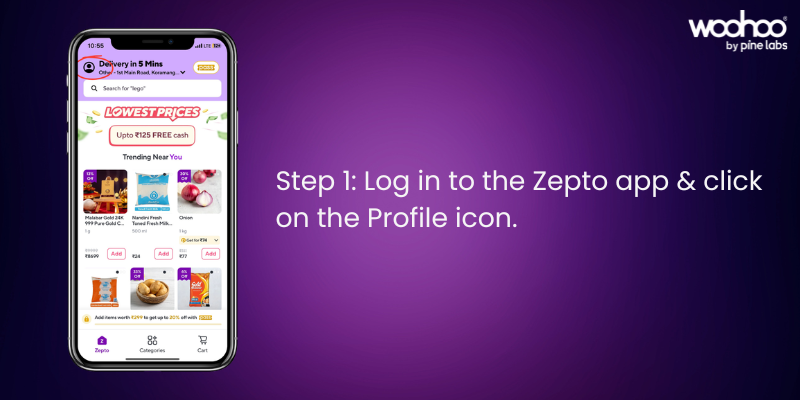
Step 1: Log in to the Zepto App.

Open the Zepto app and sign in to your account. Tap on the Profile icon in the top‑right corner.

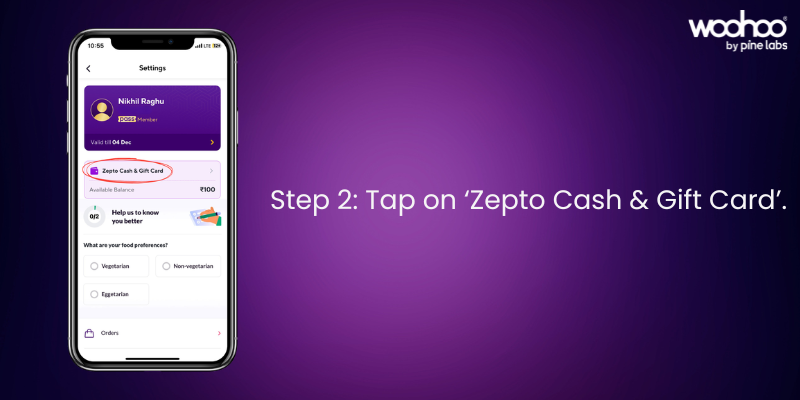
Step 2: Tap on ‘Zepto Cash & Gift Card’

In your profile section, select Zepto Cash & Gift Card to proceed.

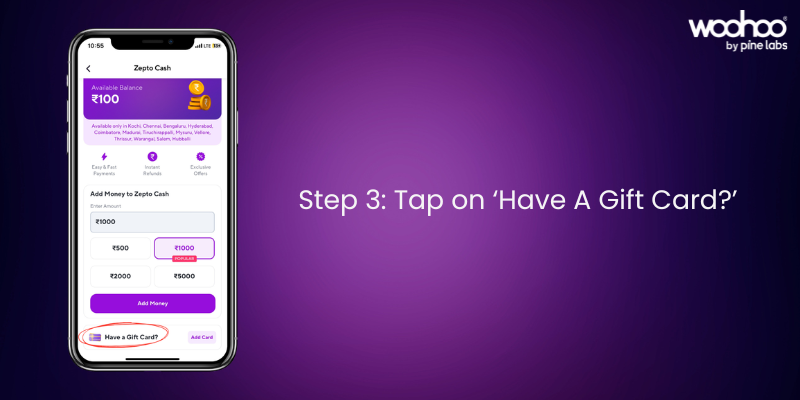
Step 3: Tap on ‘Have A Gift Card?’.

Choose the Have A Gift Card? option to enter your gift card details.

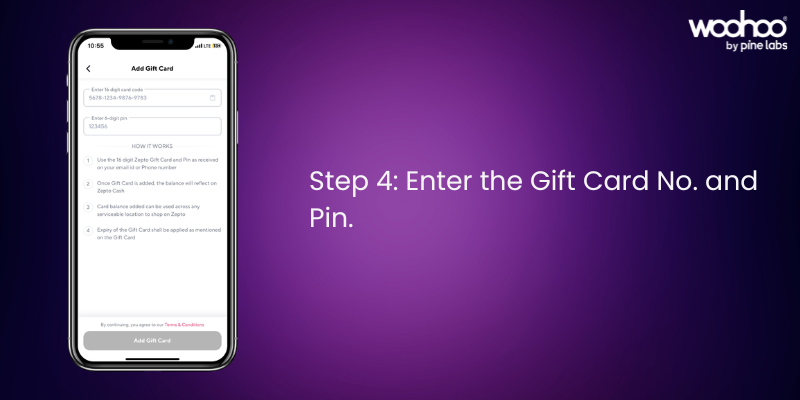
Step 4: Enter the Gift Card Number and PIN.

Locate your Gift Card Number and PIN from your email. Enter them carefully, and your balance will appear instantly in your Zepto account.

Woohoo! Your Zepto Gift Card is now ready to use.

Things to Keep in Mind

  • Your gift card balance will automatically apply at checkout.
  • If your order exceeds the balance, you can pay the remaining amount with another payment method.
  • You can check your balance anytime in the Zepto Cash & Gift Card section.
  • Gift cards are valid as per the terms mentioned at the time of purchase.

FAQs on Zepto Gift Card Redemption

Q: Where do I find my Zepto Gift Card details?

A: The Gift Card Number and PIN are sent via email after purchase.

Q: Can I use multiple gift cards on one account?

A: Yes, all balances will combine in your Zepto account.

Q: Can I transfer my gift card balance to another account?

A: No, once redeemed, the balance cannot be transferred.

Q: Where can I buy Zepto Gift Cards?

A: You can buy Zepto Gift Cards from Woohoo, India’s largest gift card store.

Why Buy Zepto Gift Cards from Woohoo

Buying Zepto Gift Cards from Woohoo is fast, convenient, and rewarding. You’ll get your gift card instantly and can use it right away for a smooth shopping experience.

Want to see the process in action? Watch our How to Redeem Zepto Gift Card video and make your first redemption even easier.

Make Shopping Easy with Zepto Gift Cards

Zepto Gift Cards are the perfect way to simplify grocery shopping and make everyday essentials more accessible. Whether you’re gifting or redeeming, the process is quick, easy, and rewarding. The gift cards can be used on ongoing offers on Zepto and can even be combined with Zepto coupons, giving you extra savings while making your shopping experience seamless and convenient.

Get your Zepto Gift Card today on Woohoo and enjoy an extra 2.5% OFF instantly.

FacebooktwitterlinkedinFacebooktwitterlinkedin

How to Redeem Your Uber Gift Card: Step‑by‑Step Guide

From daily commutes to weekend outings, every ride becomes simpler with Uber, the world’s leading ride-hailing platform. With an Uber Gift Card, you can pay seamlessly for rides across the city whether it’s getting to work, meeting friends, or exploring new places.

Instant digital delivery ensures you can add the gift card to your Uber wallet in minutes and start using it right away. Your balance is applied automatically whenever you book a ride, making the process effortless.

When you buy Uber Gift Cards from Woohoo, India’s largest gift card store, you enjoy instant access, secure transactions, and exclusive discounts. Woohoo makes it easy to save on your rides while gifting convenience to yourself or others. Got an Uber gift card and wondering how to use it? Here’s a step-by-step guide on redeeming and using your Uber gift card for rides.

What Can You Use an Uber Gift Card For?

Uber gift cards work for booking rides through the Uber app. Load up the credit, and you’re ready for your daily commutes, weekend trips, or late-night rides home.

How to Redeem Your Uber Gift Card

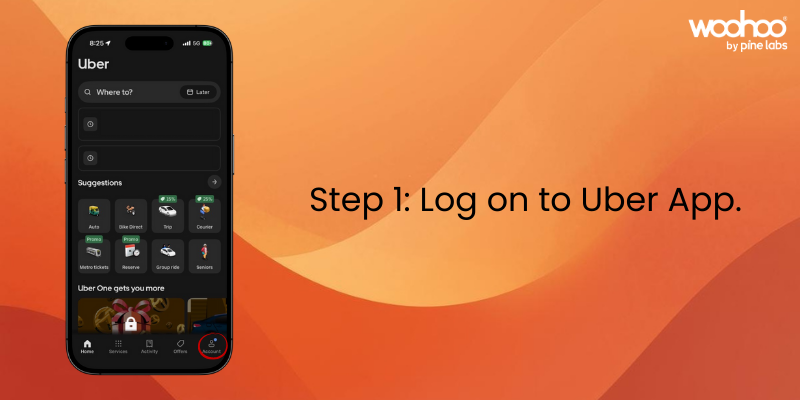
Step 1: Open Your Uber App

Download the Uber app from the Play Store or App Store if you don’t already have it. Open the app and log in.

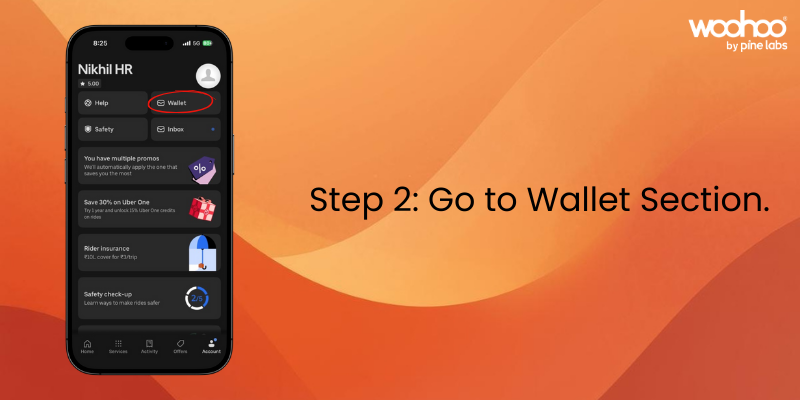
Step 2: Go to Wallet Section

Tap on your profile picture at the bottom right of the screen. From the menu, select “Wallet”.

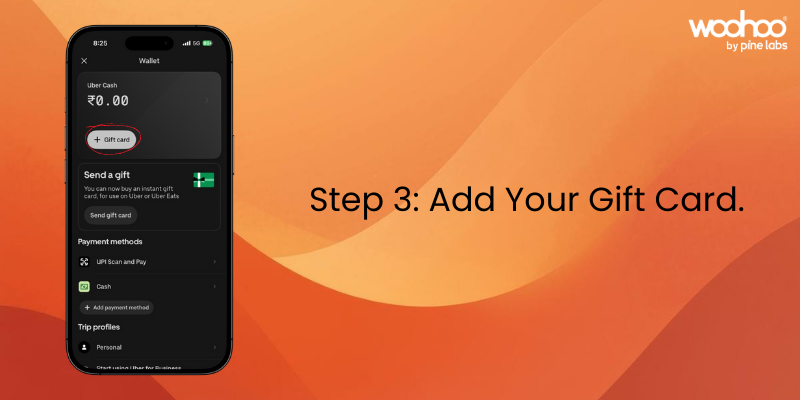
Step 3: Add Your Gift Card

In the wallet section, choose tap on “+ Gift Card.”

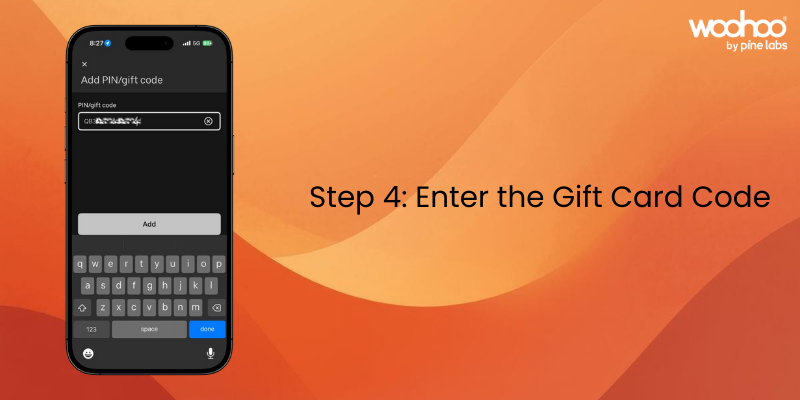
Step 4: Enter the Gift Card Code

Locate the code in your gift card email. Enter it carefully, ensuring there are no extra spaces or incorrect characters.

Step 5: Apply the Credit

Tap “Add” The balance will be added instantly, and you’ll see it reflected in your wallet.

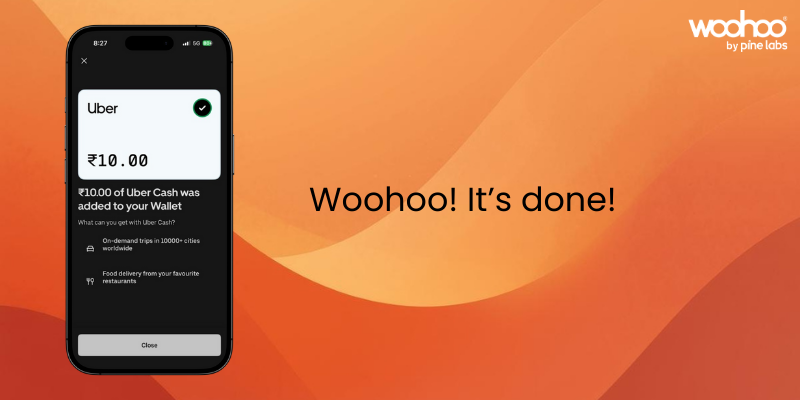
Woohoo! Your Uber Gift Card has been added successfully to your account.

Things to Keep in Mind

  • Your gift card balance is used automatically when you book a ride.
  • If your ride costs more than the balance, Uber will charge the difference to your backup payment method.
  • You can check your remaining balance anytime in the Wallet section of the app.
  • Uber gift cards are valid for 1 year from the date of purchase.

FAQs on How to Redeem Uber Gift Card

Q: Where do I find my gift card code? A: The code is sent via email when you purchase the digital gift card.

Q: Can I use multiple gift cards on one account? A: Yes, you can add multiple gift cards to your Uber account. The balances will combine.

Q: Does my Uber gift card expire? A: Uber gift cards are valid for 1 year from the date of purchase.

Q: Can I transfer my gift card balance to another account? A: No, once a gift card is redeemed to your account, the balance cannot be transferred to another Uber account.

Q: Will my gift card work for Uber Auto and Uber Moto? A: Yes, your Uber gift card balance can be used for all types of Uber rides available.

Q: Where can I buy Uber gift cards? A: You can buy Uber gift cards from Woohoo, India’s largest gift card store. Woohoo delivers them instantly and often provides special discounts.

Why Buy Uber Gift Cards from Woohoo?

Woohoo is India’s largest gift card store with 300+ brands and 1000+ offers. Uber gift cards purchased from Woohoo are delivered instantly, so you can start using them right away.

Currently, Woohoo offers upto 90% off on Uber gift cards, giving you savings before you even book your ride. Whether for yourself or as a gift, Woohoo makes it simple and cost-effective.

Head over to Woohoo, grab your Uber gift cards, and start saving on your rides today.

Watch our YouTube video for a quick walkthrough on redeeming your Uber gift card.

FacebooktwitterlinkedinFacebooktwitterlinkedin