India’s Favourite Eyewear Brand Just Got Easier to Gift
Lenskart has transformed the way India shops for eyewear over the past decade, offering prescription glasses, contact lenses, trendy sunglasses, and blue light blocking frames through one of the country’s most comprehensive online catalogues with home delivery and easy returns. Trusted by millions for its quality checks, affordable pricing, home eye test facility, and wide frame selection, Lenskart has become a household name across age groups. Today, eyewear is more than vision correction, it’s a style accessory and a health tool, from UV protection outdoors to blue light filtering for long screen hours.
Lenskart E‑Gift Card: What You Need to Know
The Lenskart E‑Gift Card gives the recipient the freedom to shop across Lenskart’s entire catalogue, from prescription frames and sunglasses to contact lenses and lens accessories. It is delivered instantly to the buyer’s email, WhatsApp and SMS, making it a genuinely convenient option whether you are gifting someone or saving on your own purchase.
The card is available in denominations starting from Rs. 1,000 and going up to Rs. 10,000, so you can choose a value that fits your budget and the occasion. Once purchased, it is valid for one full year, giving the recipient plenty of time to browse, decide, and shop without any rush. Redemption is straightforward and can be done online on the Lenskart website or app.
A Lenskart E‑Gift Card removes all of that guesswork. The recipient selects frames that suit their face shape and personal style, with no risk of wrong prescriptions or mismatched preferences. They can browse the full Lenskart catalogue, including new arrivals and sale items, entirely at their own pace. With Father’s Day around the corner, it also makes for a practical and no‑fuss gift for your dad, whether he needs new prescription glasses, sunglasses, or blue light frames for screen use.
The Woohoo Offer: Save 10% and Stack It Further
When you buy a Lenskart E‑Gift Card on Woohoo, applying coupon code WOOHOO at checkout gives you 10% OFF the purchase price of the card. That means you pay less than the face value upfront, while the recipient gets the full denomination to spend on Lenskart.
What makes this more useful is that the Lenskart E‑Gift Card can be clubbed with existing Lenskart offers and discounts at the time of redemption. The 10% you save on Woohoo is entirely separate from whatever promotions Lenskart may be running when the card is used, so both savings apply independently.
If you are planning a Lenskart purchase for yourself, buying the gift card on Woohoo first and applying code WOOHOO is a simple way to reduce your total spend by 10% before you even begin browsing. Then pair it with any active Lenskart deal at checkout for additional savings.
Buy the Lenskart E‑Gift Card on Woohoo Today
The Lenskart E‑Gift Card is available on Woohoo, with instant delivery and one‑year validity. Whether you are gifting someone or looking to save on your own next Lenskart order, it’s a practical option and a smart choice.
Use code WOOHOO for 10% OFF and give the gift of great eyewear today.
She says she doesn’t need anything. She means it. And yet, here you are, trying to figure out what to get her.
The truth is, there’s no single perfect Mother’s Day gift because there’s no single type of mom. The trick isn’t finding something generic and hoping for the best. It’s actually knowing your mom well enough to pick something that fits her.
Here’s a simple guide to doing exactly that.
🛒 The Practical Mom
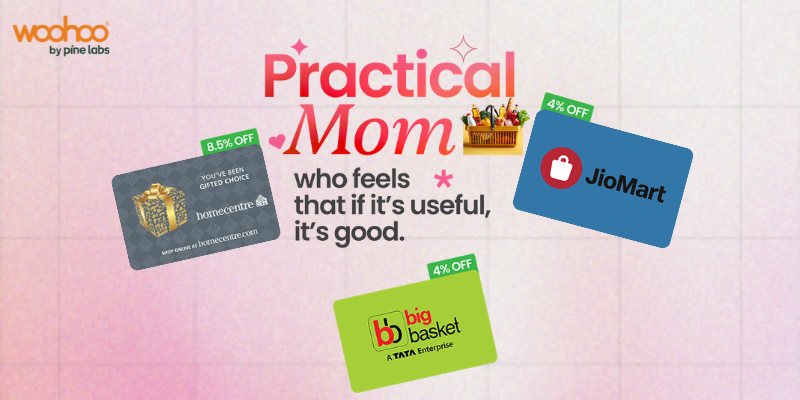
“If it’s useful, it’s good.” She’s not impressed by extravagance. She rolls her eyes at unnecessary spending and genuinely means it when she says “don’t waste money on me.” But watch her face when a gift actually makes her life easier. That’s when she lights up. The best gift for her is something she’d never justify buying for herself but will absolutely use. Think grocery vouchers, home essentials, or a card she can spend at her favourite household store. Useful is not boring to her. Useful is perfect.
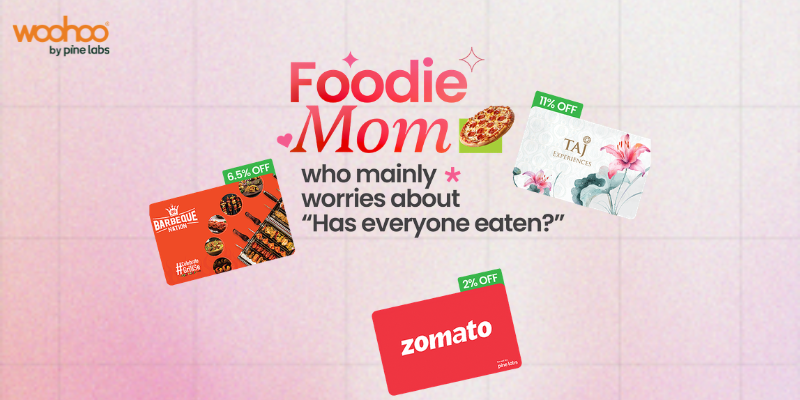
“Has everyone eaten?” Food is her love language. She texts you at 9 PM asking if you’ve had dinner. She measures a good visit by how much everyone ate. Cooking for people isn’t a task for her. It’s how she shows she cares. The best gift for her is a great meal, or the means to have one. Take her somewhere she’d never book for herself, or give her a voucher for a restaurant that matches how much she deserves to be taken care of for a change.
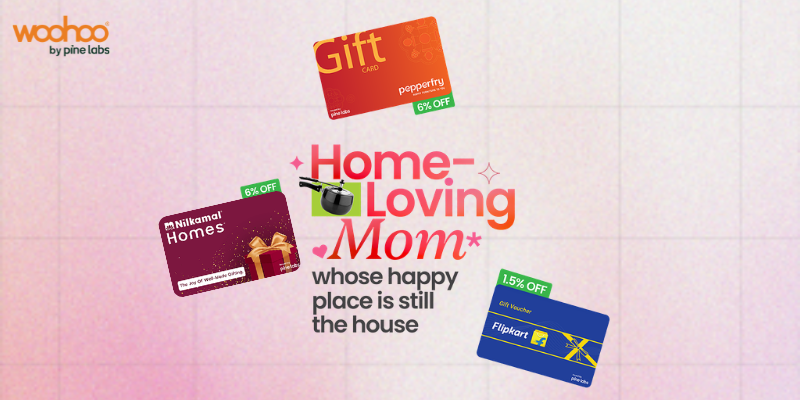
“Her happy place is still the house.” She doesn’t need a vacation. She’s been mentally redesigning the living room for months. The house isn’t just where she lives. It’s her ongoing creative project, her sanctuary, her pride. She notices every little detail and she’s always thinking about how to make it just a little better. Give her something for the home she’s always lovingly working on. A gift card she can spend on furniture, décor, or anything she’s had her eye on but kept putting off.
“We’ll go someday…” She has a running list of places she wants to visit. She saves travel reels, talks about hill stations, and says “someday” with complete sincerity every single time. The problem isn’t that she doesn’t want to go. It’s that she always puts it off, always finds a reason to wait. This year, take someday off the table. A travel gift card gives her something concrete to look forward to and removes the excuse she’d otherwise find to not go.
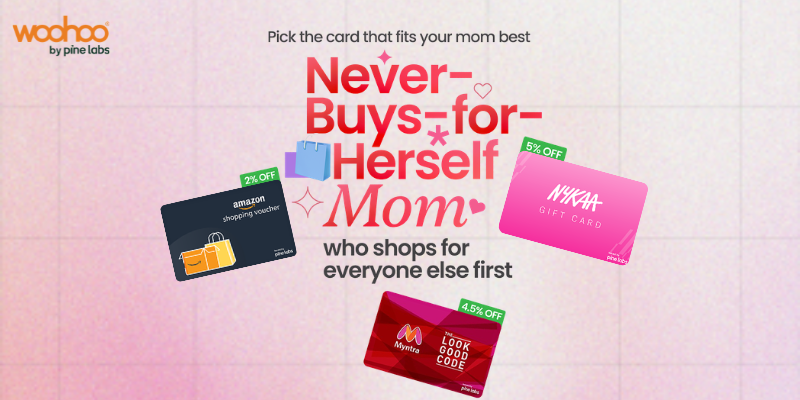
“She shops for everyone else first.” She’ll spend on you without a second thought and quietly put back anything she picked up for herself. She has things sitting in online carts she’ll never actually buy. She says “I don’t need it” about almost everything she wants. A gift card is the perfect workaround. It’s already paid for. It’s already hers. She has no excuse not to use it and for once, it’s entirely about her.
Whatever type of mom yours is, the best gift is one that shows you were actually paying attention. Not just to what she likes but to how she thinks, what she values, and what she’d never do for herself.
That’s the part no gift guide can do for you. But once you’ve figured it out, getting the right gift becomes surprisingly simple.
There’s a memory most of us carry somewhere close. It’s not grand or cinematic. It’s the small stuff. The way she stayed up when you had a fever. How she packed your lunch even when she was running late. The look she gave when you called, finally, after two weeks of radio silence. Equal parts relief and mild threat.
Mother’s Day is that one day a year when we collectively say: you matter, you deserve things, and we were paying attention too. But finding the right gift is always harder than it sounds. Because the moment you try to do something nice, she turns around and does the most mom thing in the world.
“Beta, you didn’t have to spend so much. You should have bought something for yourself!” Every mom, approximately two seconds after receiving any gift
You can’t win the argument. But you can plan smarter. What if the gift you bought for her actually helped you save money? Suddenly, you’re not just a thoughtful child. You’re a financially savvy one. Mom will be proud on two counts.
Gift Cards That Love Your Wallet Too
Here’s the move: gift your mom a Woohoo gift card from a brand she already loves, and buy it at a discount. She gets her favourite brand. You save a percentage on the purchase. Nobody overspends. Everyone wins.
Woohoo is one of India’s leading gift card platforms, with hundreds of brand partners across fashion, beauty, groceries, travel, electronics, and more. Many of these gift cards are available below face value. Which means you’re essentially buying Rs. 1,000 worth of gift cards for less with savings that can go up to 90%. Think of it as an easy way to get guaranteed savings on gifts your mom will actually use. Not something that just sits at home without being used.
This Mother’s Day, we’ve picked five gift cards that make perfect sense for the most important person in your life.
India’s favourite beauty destination with skincare, makeup, haircare, and wellness all in one place. Perfect for the mom who finally has time to take care of herself, who deserves that serum she’s been eyeing but won’t buy. Let her scroll through Nykaa guilt-free. Buy Rs. 1,000 worth and pay only Rs. 950.
Fashion for every style, every size, every occasion. From kurtas to casualwear to festive looks. Perfect for moms who love looking put-together but always end up buying clothes for everyone else. This one’s for her wardrobe, finally. She picks what she wants, and you’ve already saved on the card.
Electronics and appliances from kitchen gadgets to smartphones to air purifiers. Perfect for the mom who’s been asking for a new blender since 2019, or who secretly wants wireless earphones but would never buy them herself. Croma has it all, and a little saving is still a saving.
Flights, hotels, holidays, and travel packages across India and the world. Perfect for the mom who’s spent years travelling for school pickups and grocery runs. It’s time she travelled for herself. Plan that family trip, or gift her a getaway she’s been dreaming about. At 7% off, this is the biggest saving in the bunch. Buy Rs. 5,000 worth and you’ve already saved Rs. 350 before she’s even packed her bag.
Groceries, fresh produce, organic products, and daily essentials delivered to her door. Perfect for the mom who feeds everyone and somehow always runs out of things. A BigBasket gift card means she can stock up on everything she loves, including those snacks she buys “for the house” and quietly eats herself. No judgement. She’s earned it.
A Quick Maths Check
Buy Rs. 1,000 in MakeMyTrip gift cards and you’ve already saved Rs. 70. Stack a couple of these across different brands and your gift shopping has basically paid for itself. Your mom gets the brands she loves. You spend less. This is what adulting looks like when it works out.
The Smartest Way to Show You Care
The truth about Mother’s Day gifts is that it’s never really about the price tag. It’s about the thought behind it. The fact that you noticed what she loves, remembered what she needs, and took a moment to make her feel seen. Gift cards let you do exactly that, without overspending. You’re giving her the freedom to choose, the joy of shopping guilt-free, and a practical gift she’ll actually use. At a discount, so your wallet stays happy too.
Amazon Pay, launched by Amazon India, is a digital wallet that lets you store money and use it across shopping, bill payments, recharges, and more. If you already have an Amazon account, you can start using Amazon Pay right away. It’s accepted on Amazon.in and at hundreds of partner merchants, making everyday transactions simple, fast, and convenient.
Redeeming your Amazon Pay voucher is a quick and simple process. Just follow the steps below and your gift card balance will be added to your Amazon Pay wallet in no time.
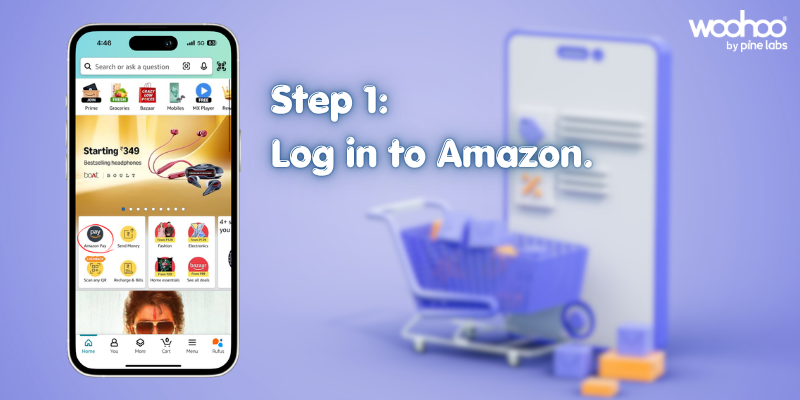
Step 1: Log In to Your Amazon Account and Click on “Amazon Pay”.
Open the Amazon India website or app and log in to your account. Once you are on the homepage, look for the “Amazon Pay” option in the main navigation menu at the top of the page. Click on it to enter the Amazon Pay section of your account.
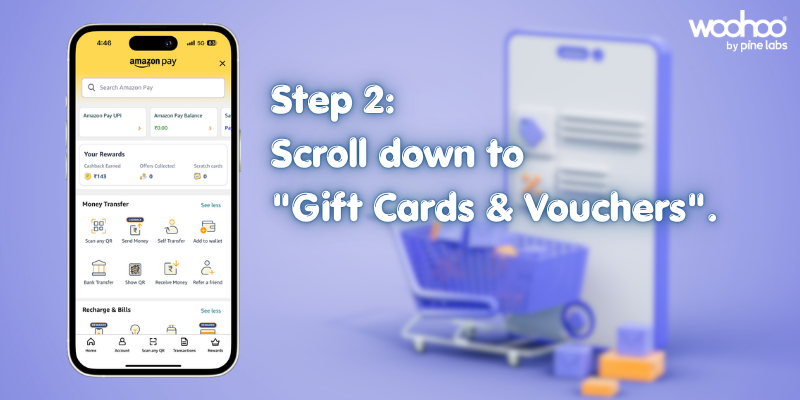
Step 2: Scroll to “Gift Cards and Vouchers”.
Once you are inside the Amazon Pay section, scroll down the page to find the area labelled “Gift Cards and Vouchers.” This section specifically manages all gift card related activities for your account, including adding new gift cards and checking existing balances.
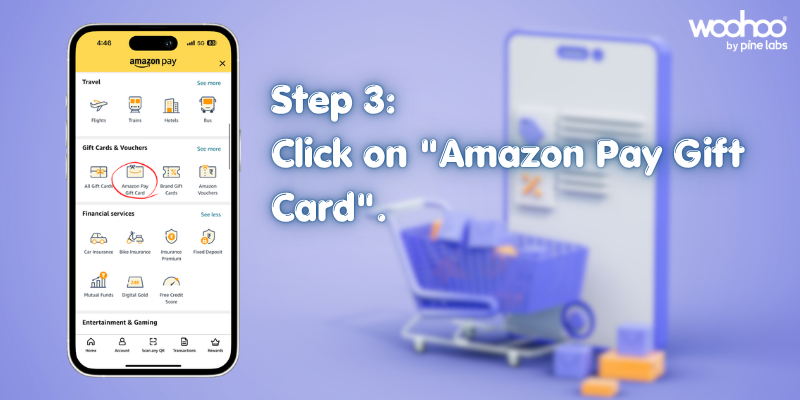
Step 3: Click on “Amazon Pay Gift Card”.
Within the Gift Cards and Vouchers section, you will see the option for “Amazon Pay Gift Card.” Click on it to proceed to the gift card redemption page.
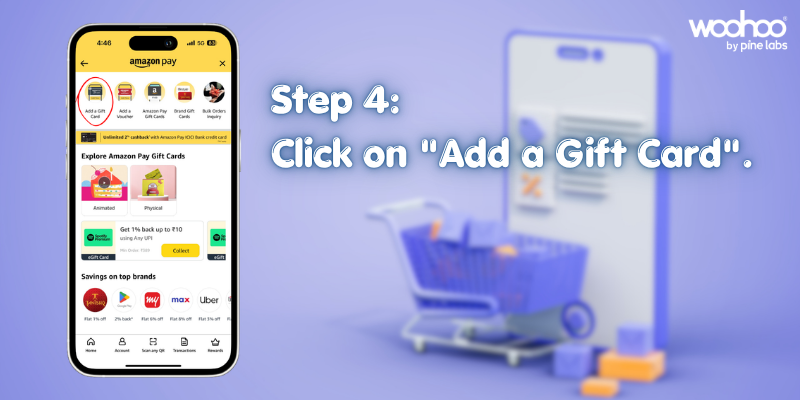
Step 4: Click on “Add a Gift Card”.
On the Amazon Pay Gift Card page, you will find a button or link that says “Add a Gift Card.” Click on this to bring up the field where you can enter your gift card code.
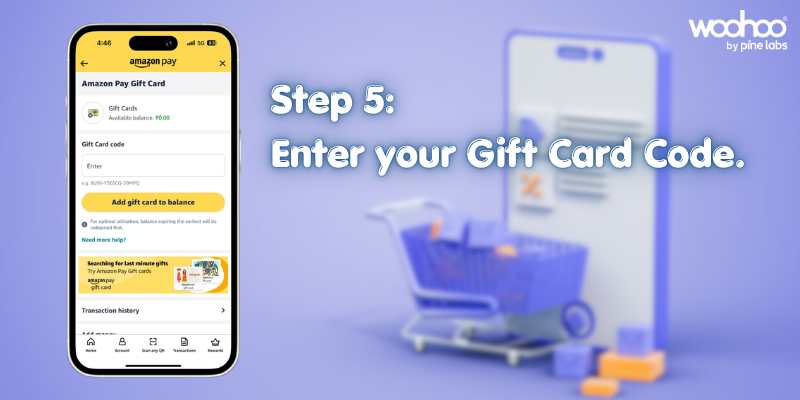
Step 5: Enter the Gift Code and Click “Add Gift Card to Balance”.
Enter the alphanumeric code sent to you via email or SMS. Once you have entered the code correctly, click on the “Add Gift Card to Balance” button to complete the process.
You have successfully redeemed your Amazon Pay voucher. The balance will be instantly credited to your Amazon Pay wallet and will be available for use right away.
Where Can You Use Your Amazon Pay Balance?
Once your Amazon Pay balance is topped up through a redeemed voucher, you can use it across a variety of platforms and services. Here is a quick overview of where your balance works:
Shopping on Amazon India: The most direct use of your Amazon Pay balance is for purchases on Amazon.in. Whether you are buying a phone, a book, home appliances, or daily essentials, your Amazon Pay balance can be applied at checkout.
Bill Payments: Amazon Pay allows you to pay a wide range of utility bills directly from your wallet. Electricity, water, gas, broadband, and other bill categories are supported within the Amazon Pay interface.
Mobile and DTH Recharges: You can top up your prepaid mobile number or recharge your DTH connection using your Amazon Pay balance in just a few clicks.
Partner Merchants: Amazon Pay is accepted at many partner platforms and offline stores. From food delivery apps to travel booking portals and local kirana stores that accept digital payments, your Amazon Pay balance can be used in a growing ecosystem of merchants.
Insurance and Investments: Amazon Pay also supports payments for certain insurance premiums and small savings or investment products available through partner services on the platform.
Save extra When You Buy Amazon Pay Vouchers from Woohoo
When you purchase an Amazon Pay voucher from Woohoo, you get a flat 0.5% discount on your purchase. While this may sound like a small percentage, it adds up meaningfully over time, especially if you regularly use Amazon Pay for groceries, utility bills, and daily expenses.
Think about it this way: if you buy Amazon Pay vouchers worth Rs. 10,000 from Woohoo over the course of a month, you save Rs. 50 instantly at the time of purchase. Over a year, that amounts to Rs. 600 or more in savings, simply by choosing to buy your vouchers from Woohoo instead of anywhere else.
Woohoo makes the entire process convenient as well. You can purchase the Amazon Pay Gift Card directly on the Woohoo website or app, receive it instantly via email, WhatsApp and SMS, and then follow the simple redemption steps mentioned above to add it to your Amazon Pay balance. There are no hidden charges, no complicated processes.
For households that regularly pay bills, buy groceries online, or do frequent shopping on Amazon, this is one of the easiest and most effortless ways to build in a consistent saving with zero extra effort.
Frequently Asked Questions About Amazon Pay Vouchers
How long is the Amazon Pay Gift Card valid?
Amazon Pay Gift Cards typically come with a validity period of one year from the date of purchase. However, once the voucher has been redeemed and the balance has been added to your Amazon Pay wallet, the balance itself does not expire. It is best to redeem the code before the voucher’s expiry date to avoid losing the value.
Can I use my Amazon Pay balance partially?
Yes, you can use your Amazon Pay balance partially. If the amount of your purchase is less than the total balance in your Amazon Pay wallet, only the required amount will be deducted. The remaining balance stays in your wallet for future use. There is no requirement to use the entire balance in a single transaction.
Can I transfer my Amazon Pay balance to another account?
Amazon Pay balance cannot be directly transferred to another Amazon account. The balance is tied to the account on which the voucher was redeemed and can only be used for transactions made through that account. If you want to give someone a gift, it is better to purchase a new Amazon Pay Gift Card and share the unredeemed code with them.
What should I do if the gift card code does not work?
If you enter the gift card code and it does not work, reach out to Amazon customer support or the platform from where the voucher was purchased. If you bought it from Woohoo, the Woohoo support team will be happy to assist you with the resolution.
Where can I check my Amazon Pay balance?
You can check your Amazon Pay balance at any time by logging into your Amazon account and navigating to the Amazon Pay section. Your current wallet balance will be displayed on the main Amazon Pay page. You can also see it reflected at the time of checkout when you select Amazon Pay as your payment method.
Start Saving Today with Woohoo
Redeeming an Amazon Pay voucher is a simple process that takes less than two minutes, and the benefits are immediate. Whether you received a gift card from someone or purchased it yourself, your Amazon Pay balance is one of the most flexible and widely accepted forms of digital payment available in India today.