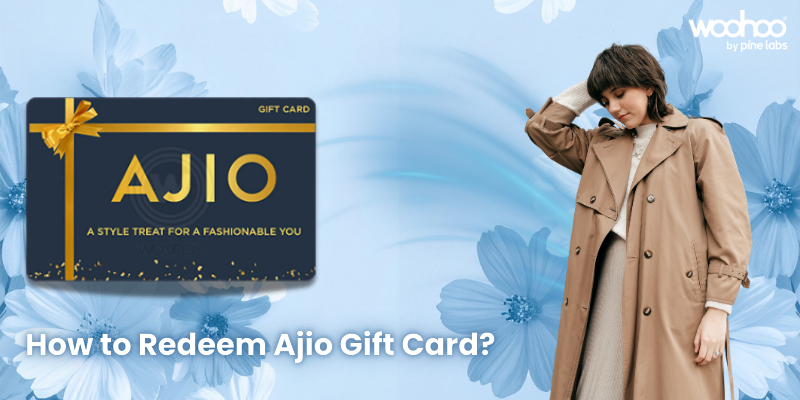
Step‑by‑Step: How to Use Ajio Gift Card?

Ajio has become one of India’s most stylish destinations for fashion and lifestyle shopping, offering everything from global brands to exclusive collections. With its easy‑to‑use app and website, Ajio makes shopping seamless and enjoyable.

A Ajio Gift Card adds even more convenience to the experience. Whether you’ve received one as a gift or purchased it yourself, redeeming your card is quick and straightforward. Here’s how you can do it.

Step‑by‑Step Redemption Process

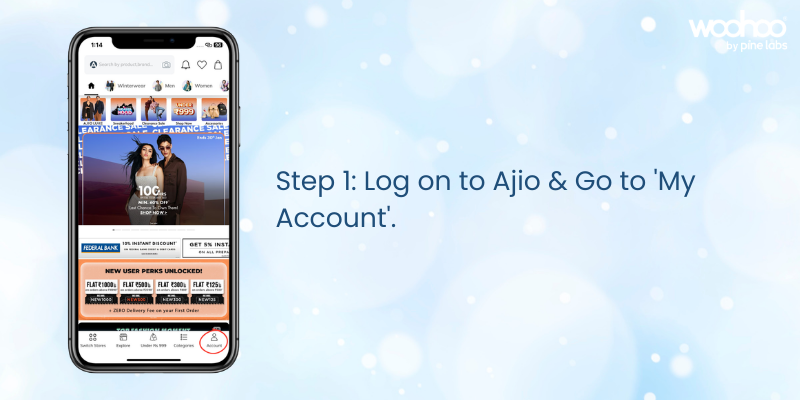
Log on to Ajio & Go to “My Account”.

Sign in to your Ajio account on the app or website and navigate to the “My Account” section.

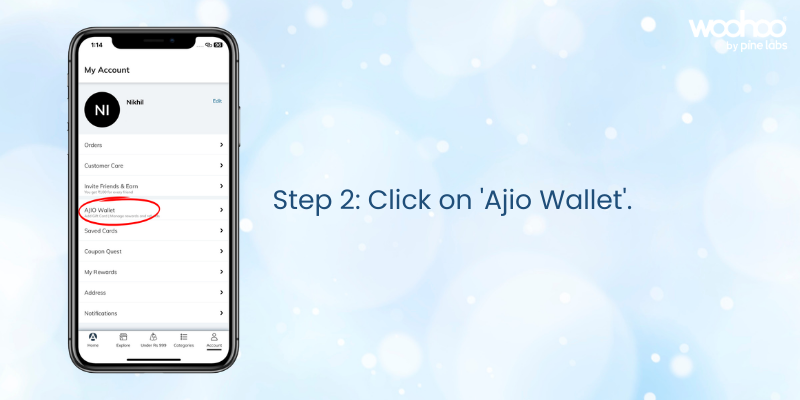
Click on “Ajio Wallet”.

Open your Ajio Wallet to view available payment and balance options.

Click on “Add” under ‘Have a Gift Card?’.
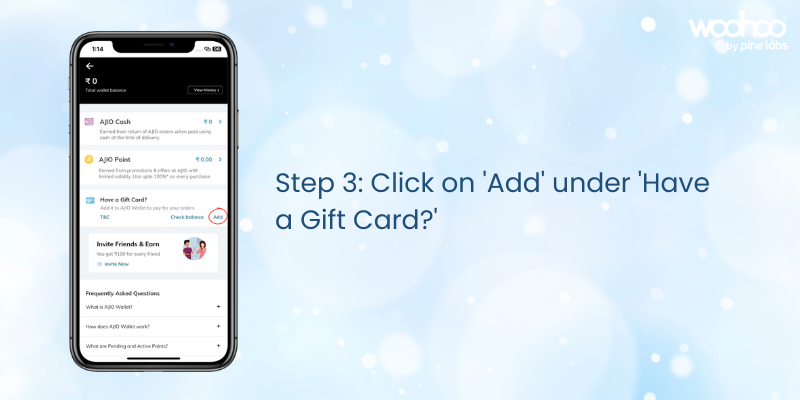
Select the option to add a gift card to your wallet.

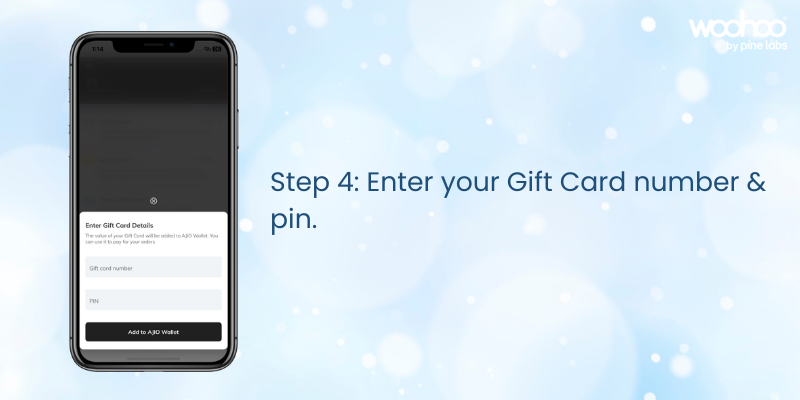
Enter your Gift Card number & PIN.

Type in your Ajio Gift Card details exactly as provided in your email or Woohoo account. Once applied, your balance will reflect instantly in your Ajio Wallet.

Your Ajio Gift Card is now ready to use at checkout for any purchase.

Things to Keep in Mind

  • Your gift card balance will automatically apply at checkout.
  • If your order exceeds the balance, pay the remaining amount with another payment method.
  • You can check your balance anytime in the “Ajio Wallet” section of your account.
  • Gift cards are valid for 1 year from the date of purchase.

FAQs on Ajio Gift Card Redemption

Q: Where do I find my Ajio Gift Card details?

A: The Gift Card Number and PIN are sent via email immediately after purchase or can be checked under “Gift Cards” in your Woohoo profile.

Q: Can I use multiple gift cards on one account?

A: Yes, balances from multiple cards will combine in your Ajio Wallet.

Q: Can I transfer my gift card balance to another account?

A: No, once redeemed, the balance cannot be transferred.

Q: Where can I buy Ajio Gift Cards?

A: You can buy Ajio Gift Cards from Woohoo, India’s largest gift card store.

Q: Can Ajio Gift Cards be used during sales or promotions?

A: Yes, Ajio Gift Cards can be combined with ongoing Ajio promo codes and offers for extra savings.

Q: What happens if my order is cancelled?

A: The refunded amount will be credited back to your Ajio Wallet balance linked to the gift card.

Ajio Offer – Save Extra with Woohoo

Woohoo brings you an exclusive deal on Ajio E‑Gift Cards. Get Flat 25% OFF instantly when you purchase through Woohoo. Even better, your Ajio Gift Card can be combined with ongoing Ajio coupon codes and offers, helping you unlock extra discounts and enjoy more value on every order.

Make Shopping Easy with Ajio Gift Cards

Ajio Gift Cards are the perfect way to simplify fashion shopping and make stylish essentials more accessible. Whether you’re gifting or redeeming, the process is quick, easy, and rewarding. Get your Ajio Gift Card today on Woohoo and enjoy instant 25% OFF with this special offer.

FacebooktwitterlinkedinFacebooktwitterlinkedin

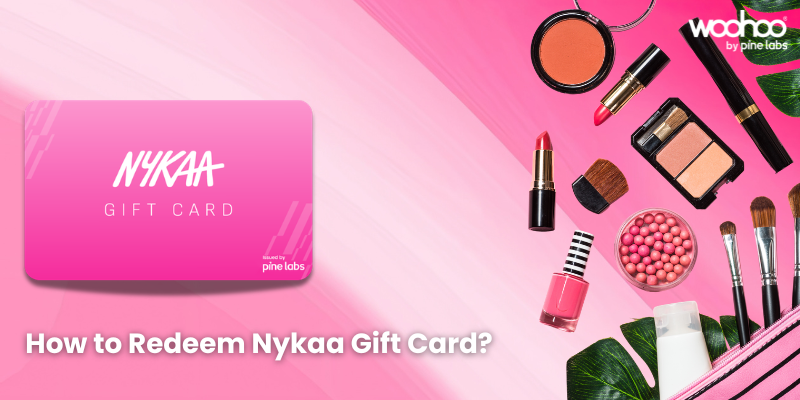
How to Redeem Nykaa Gift Card – Step‑by‑Step Guide

Nykaa has become one of India’s most trusted beauty and lifestyle platforms, offering everything from skincare and makeup to fashion, wellness, and accessories. With reliable delivery, secure payments, and a wide product range, Nykaa makes shopping simple and convenient.

A Nykaa Gift Card adds even more ease to the experience. Whether you’ve received one as a gift or purchased it yourself, redeeming your card is straightforward.

Step‑by‑Step Redemption Process

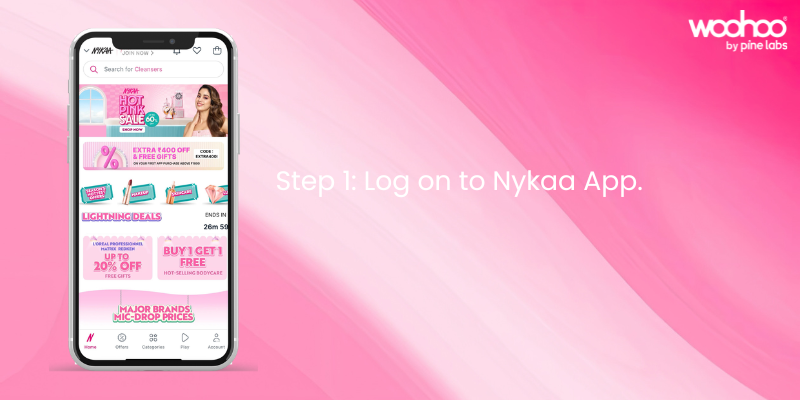
Step 1: Log on to Nykaa.

Sign in to your Nykaa account on the app or website.

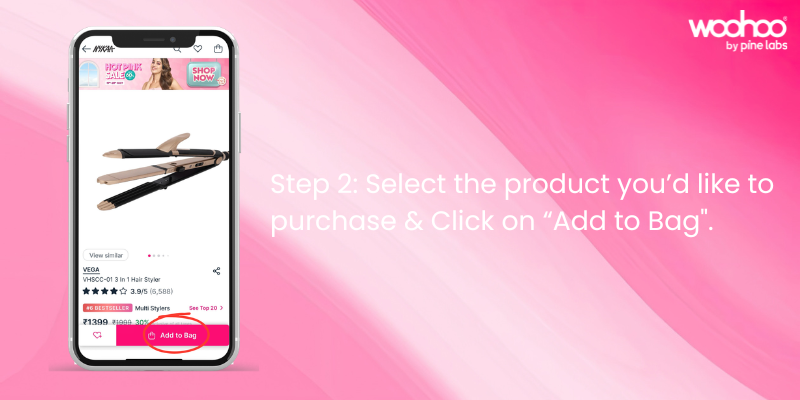
Step 2: Select the product you’d like to purchase.

Browse Nykaa’s catalog, add items to your cart, and click on “Proceed to Pay.”

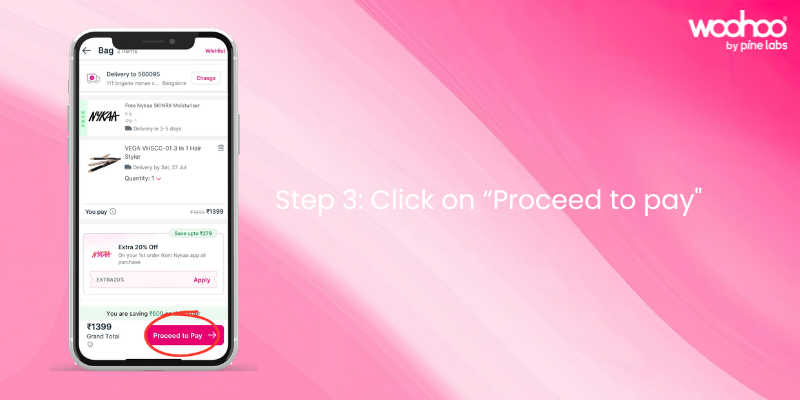
Step 3: Click on “Proceed to Pay”.

Confirm your cart and move to the payment page.

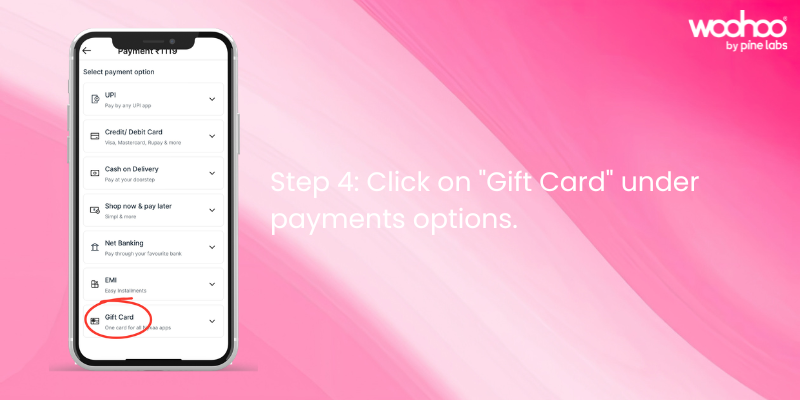
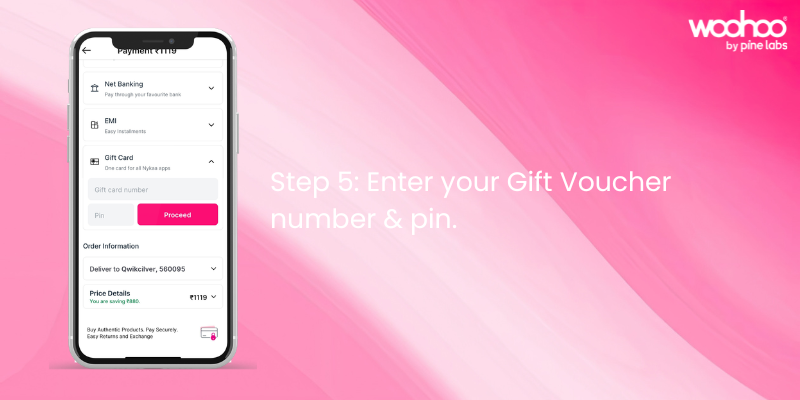
Step 4: Click on “Gift Card” under payment options.

At the checkout page, choose Gift Card as your payment method.

Step 5: Enter your Gift Card number & PIN.

Type in your Nykaa Gift Card number and PIN exactly as provided in your email or Woohoo account. Once applied, your balance will reflect instantly.

Your Nykaa Gift Card is now ready to use at checkout.

Things to Keep in Mind

  • Your gift card balance will automatically apply at checkout.
  • If your order exceeds the balance, pay the remaining amount with another payment method.
  • You can check your balance anytime in the “Gift Card” section of your account.
  • Gift cards are valid for 1 year from the date of purchase.

FAQs on Nykaa Gift Card Redemption

Q: Where do I find my Nykaa Gift Card details?

A: The Gift Card Number and PIN are sent via email immediately after purchase or can be checked under “Gift Cards” in your Woohoo profile.

Q: Can I use multiple gift cards on one account?

A: Yes, balances from multiple cards will combine in your Nykaa account.

Q: Can I transfer my gift card balance to another account?

A: No, once redeemed, the balance cannot be transferred.

Q: Where can I buy Nykaa Gift Cards?

A: You can buy Nykaa Gift Cards from Woohoo, India’s largest gift card store.

Nykaa Offer – Save Extra with Woohoo

Woohoo brings you an exclusive deal on Nykaa E‑Gift Cards. Get Flat 6.5% OFF instantly when you apply the promo code NYKAA65 at checkout. Even better, your Nykaa Gift Card can be combined with ongoing Nykaa offers and promo codes, helping you unlock extra discounts and enjoy more value on every order.

Why Choose Nykaa Gift Cards?

Nykaa Gift Cards are the perfect way to simplify shopping and make beauty, fashion, and lifestyle essentials more accessible. They are ideal for birthdays, anniversaries, festive gifting, or simply treating yourself. Whether you’re gifting or redeeming, the process is quick, easy, and rewarding.

Get your Nykaa Gift Card today on Woohoo and enjoy instant 6.5% OFF with promo code NYKAA65.

FacebooktwitterlinkedinFacebooktwitterlinkedin

How to Redeem JioMart Gift Card – Step‑by‑Step Guide.

JioMart has become one of India’s most trusted online shopping platforms, offering everything from groceries and household essentials to fashion, electronics, and lifestyle products. With reliable delivery, secure payments, and a wide product range, JioMart makes shopping simple and convenient.

A JioMart Gift Card adds even more ease to the experience. Whether you’ve received one as a gift or purchased it yourself, redeeming your card is straightforward. Here’s how you can do it.

Step‑by‑Step Redemption Process

Step 1: Log on to JioMart.

Sign in to your JioMart account on the app or website.

Step 2: Select the product you’d like to purchase & click on “Place Order”.

Browse JioMart’s catalog, add items to your cart, and proceed to checkout.

Step 3: Click on “Gift Card” under Redemption Options.

At the payment page, choose Gift Card as your redemption method.

Step 4: Enter your Gift Voucher Number & PIN.

Type in your JioMart Gift Card number and PIN exactly as provided in your email or Woohoo account. Once applied, your balance will reflect instantly.

Your JioMart Gift Card is now ready to use at checkout.

Things to Keep in Mind

  • Your gift card balance will automatically apply at checkout.
  • If your order exceeds the balance, pay the remaining amount with another payment method.
  • You can check your balance anytime in the “Gift Card” section of your account.
  • Gift cards are valid for 1 year from the date of purchase.

FAQs on JioMart Gift Card Redemption

Q: Where do I find my JioMart Gift Card details?

A: The Gift Card Number and PIN are sent via email immediately after purchase or you can also check under “Gift Cards” in your Woohoo profile.

Q: Can I use multiple gift cards on one account?

A: Yes, balances from multiple cards will combine in your JioMart account.

Q: Can I transfer my gift card balance to another account?

A: No, once redeemed, the balance cannot be transferred.

Q: Where can I buy JioMart Gift Cards?

A: You can buy JioMart Gift Cards from Woohoo, India’s largest gift card store.

JioMart Offer – Save Extra with Woohoo

Woohoo brings you an exclusive deal on JioMart E‑Gift Cards. Get Flat 4% OFF instantly when you apply the promo code JM4 at checkout. Even better, your JioMart Gift Card can be combined with ongoing JioMart promo codes and offers, helping you unlock extra discounts and enjoy more value on every order. It’s a simple way to make shopping smarter, more affordable, and completely hassle‑free.
Make Shopping Easy with JioMart Gift Cards

JioMart Gift Cards are the perfect way to simplify shopping and make everyday essentials more accessible. Whether you’re gifting or redeeming, the process is quick, easy, and rewarding. They can be used across categories like groceries, fashion, electronics, and household essentials, ensuring you save more while enjoying a seamless shopping experience.

Get your JioMart Gift Card today on Woohoo and enjoy instant 4% OFF with promo code JM4.

FacebooktwitterlinkedinFacebooktwitterlinkedin

How to Redeem Your Google Play Gift Code: Step‑by‑Step Guide

Google Play is the hub for apps, games, movies, books, and more on Android devices. With a Google Play Gift Code, you can instantly add balance to your account and enjoy premium content without needing a credit card. Whether you’ve received one as a gift or purchased it yourself, redeeming your google play code is quick and simple. Here’s how you can do it.

Step‑by‑Step Redemption Process

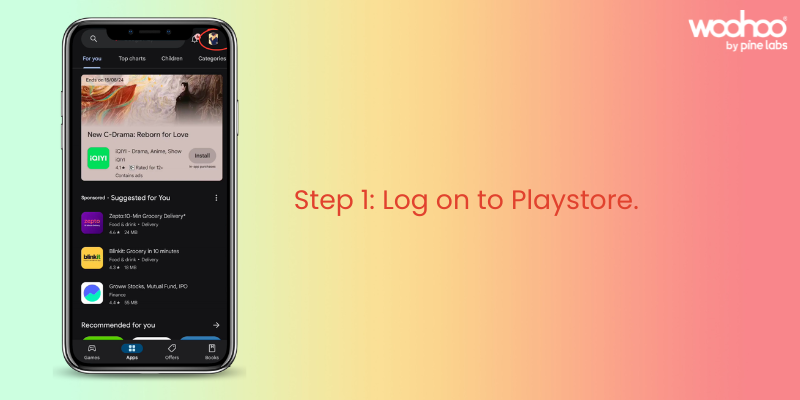
Step 1: Log on to Play Store.

Open the Google Play Store app on your Android device. Tap on your profile icon in the top‑right corner. Make sure you’re signed in to the correct Google account.

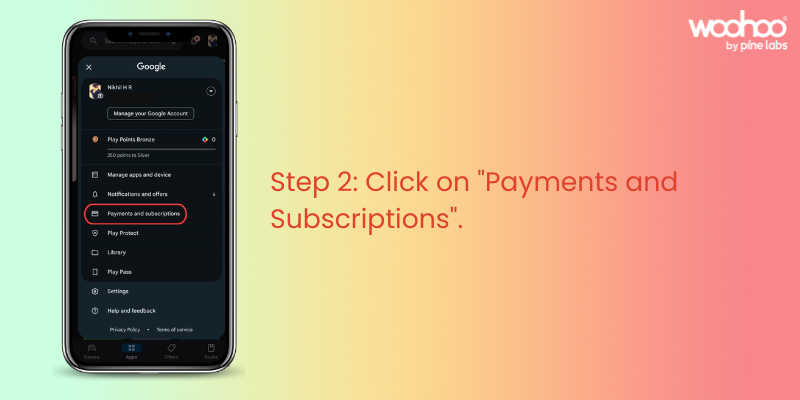
Step 2: Click on “Payments and Subscriptions.”

From the menu, select “Payments and Subscriptions.” This section lets you manage payment methods, subscriptions, and redeem codes.

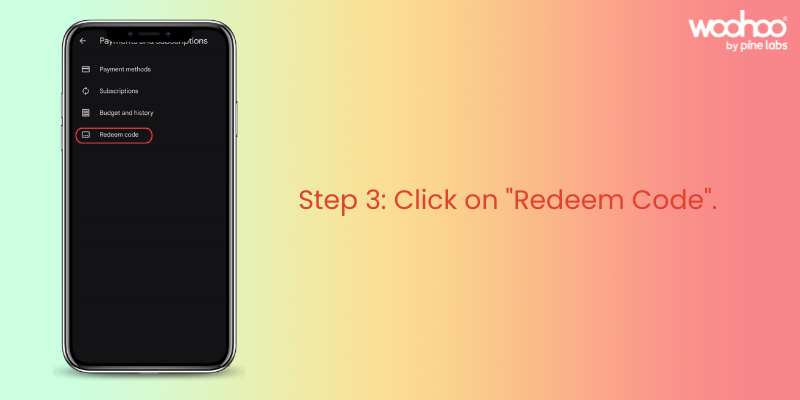
Step 3: Click on “Redeem Code.”

Inside “Payments and Subscriptions,” locate the “Redeem Code” option. Tap on it to proceed.

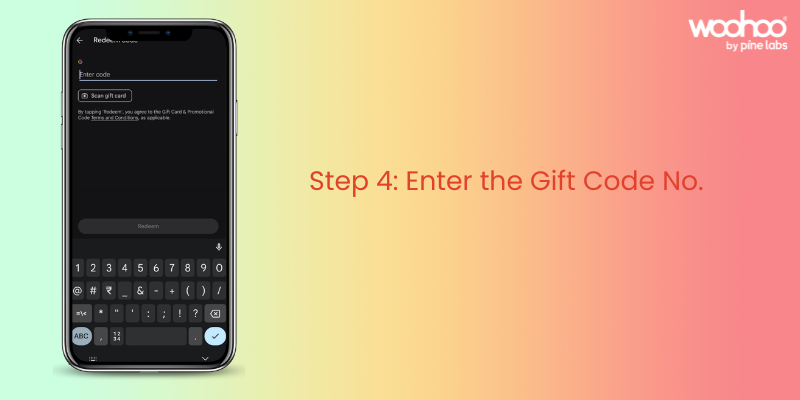
Step 4: Enter Your Google Play Gift Code.

Type in the Google Play Gift Code exactly as shown in your email or Woohoo account. Once entered, tap “Redeem” to apply the balance to your account. Your Google Play balance will be updated instantly.

Woohoo! Your Google Play Gift Code is now ready to use.

Things to Keep in Mind

  • Your gift code balance will automatically apply when you purchase apps, games, or other content.
  • If your order exceeds the balance, you can pay the remaining amount with another payment method.
  • You can check your balance anytime in the “Payments and Subscriptions” section of the Play Store.
  • Gift codes are valid as per the terms mentioned at the time of purchase.

FAQs on Google Play Gift Code Redemption

Q: Where do I find my Google Play Gift Code details?

A: The Gift Code is sent via email immediately after purchase. If you purchased through Woohoo, you can also log in to the Woohoo app or website under “Gift Cards” in My Profile to view your code and balance anytime.

Q: Can I use multiple gift codes on one account?

A: Yes, all balances will combine in your Google Play account.

Q: Can I transfer my gift code balance to another account?

A: No, once redeemed, the balance is tied to your Google account and cannot be transferred.

Q: Where can I buy Google Play Gift Codes?

A: You can buy Google Play Gift Codes instantly from Woohoo, India’s largest gift card store.

Woohoo Exclusive Offer

Buying Google Play Gift Codes from Woohoo is fast, convenient, and rewarding. You’ll get your code instantly and can use it right away for apps, games, movies, and more. Plus, Woohoo gives you 4.5% cashback in the form of Woohoo loyalty points. These points can be used to buy gift cards from 300+ brands on Woohoo from fashion and food to travel and lifestyle.

For gamers, this is especially valuable: you can use your Google Play Gift Code balance for in‑app purchases, upgrades, and premium content, while stacking Woohoo loyalty points for future savings across other categories.

Make Entertainment Easy with Google Play Gift Codes

Google Play Gift Codes are the perfect way to simplify digital purchases. Whether you’re gifting or redeeming, the process is quick, easy, and rewarding. Codes can be used on ongoing offers in the Play Store and combined with coupons, giving you extra savings while making your entertainment seamless and convenient.

Get your Google Play Gift Code today on Woohoo and enjoy instant balance plus 4.5% cashback loyalty points for even more rewards.

FacebooktwitterlinkedinFacebooktwitterlinkedin

How to Redeem Your Flipkart Gift Card: Step‑by‑Step Guide

Flipkart has become India’s go‑to destination for online shopping, offering everything from electronics and fashion to groceries and lifestyle essentials. With a smooth app and website experience, millions of customers rely on Flipkart for fast delivery, great deals, and a wide product range.

Now, with a Flipkart Gift Card, shopping becomes even more rewarding. Whether you’ve received one as a thoughtful gift or purchased it yourself, redeeming your card is quick and simple. Here’s how you can do it.

Step‑by‑Step Redemption Process

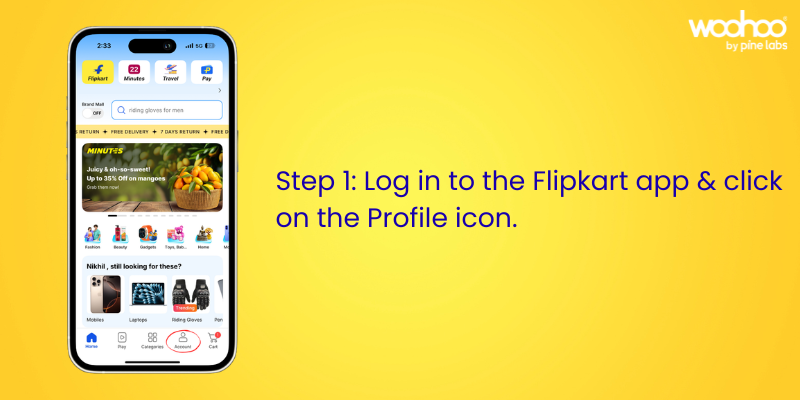
Step 1: Log on to Flipkart and open your Account.

Sign in to your Flipkart account. Tap on the profile icon at the bottom of the screen to access your account settings.

Step 2: Scroll down to “Saved Credit/Debit & Gift Cards.”

In the account section, scroll until you find the “Saved Credit/Debit & Gift Cards” option.

Step 3: Click on “Saved Credit/Debit & Gift Cards.”

Select this option to manage your saved payment methods and gift cards.

Step 4: Click on “Add Flipkart Gift Card.”

Choose “Add Flipkart Gift Card” to begin redeeming your card.

Step 5: Enter Your Flipkart Gift Card Number and PIN.

Type in your Flipkart Gift Card number and PIN exactly as shown in your email or Woohoo account. Click “Apply” to add the balance to your account. Your Flipkart Gift Card balance will now be available for use at checkout.

Woohoo! Your Flipkart Gift Card is ready to use.

Things to Keep in Mind

  • Your gift card balance will automatically apply at checkout.
  • If your order exceeds the balance, you can pay the remaining amount with another payment method.
  • You can check your balance anytime in the “Saved Credit/Debit & Gift Cards” section.
  • Gift cards are valid as per the terms mentioned at the time of purchase.

FAQs on Flipkart Gift Card Redemption

Q: Where do I find my Flipkart Gift Card details?

A: Your Flipkart Gift Card Number and PIN are sent via email immediately after purchase. If you purchased through Woohoo, you can also log in to the Woohoo app or website and check under “Gift Cards” in My Profile to view your Flipkart Gift Card details anytime. You can also check your current balance directly in the Woohoo app or website, making it easy to track how much you have left to spend.

Q: Can I use multiple gift cards on one account?

A: Yes, all balances will combine in your Flipkart account.

Q: Can I transfer my gift card balance to another account?

A: No, once redeemed, the balance cannot be transferred.

Q: Where can I buy Flipkart Gift Cards?

A: You can buy Flipkart Gift Cards from Woohoo, India’s largest gift card store.

Why Buy Flipkart Gift Cards from Woohoo

Buying Flipkart Gift Cards from Woohoo is fast, convenient, and rewarding. You’ll get your gift card instantly and can use it right away for a seamless shopping experience. Plus, when you pay with a Flipkart Gift Card, you can save extra! Woohoo gives you an additional 1.5% OFF on your purchase.

And here’s something special: Woohoo is offering an exclusive 80% OFF on Flipkart Gift Cards, giving you the perfect chance to try gift cards and enjoy massive savings on your next Flipkart order.

Make Shopping Easy with Flipkart Gift Cards

Flipkart Gift Cards are the perfect way to simplify shopping and make everyday essentials more accessible. Whether you’re gifting or redeeming, the process is quick, easy, and rewarding. The gift cards can be used on ongoing offers on Flipkart and can even be combined with Flipkart coupons, giving you extra savings while making your shopping experience seamless and convenient.

Get your Flipkart Gift Card today on Woohoo and enjoy instant savings plus exclusive offers.

FacebooktwitterlinkedinFacebooktwitterlinkedin

How to Redeem Your Zepto Gift Card: Step‑by‑Step Guide.

Zepto has transformed the way we shop for groceries and essentials. With lightning‑fast deliveries, fresh produce, and a seamless app experience, it’s never been easier to get everything you need delivered right to your doorstep.

And now, with a Zepto Gift Card, shopping becomes even more convenient. Whether you’ve received one as a thoughtful gift or purchased it yourself, redeeming your card is quick and simple. Here’s how you can do it.

Step‑by‑Step Redemption Process

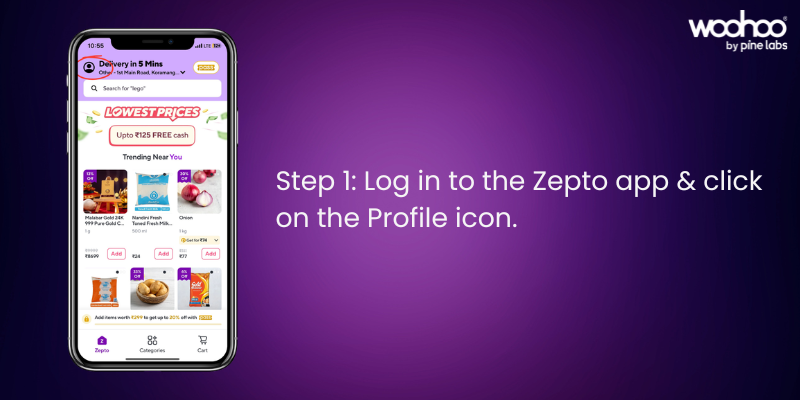
Step 1: Log in to the Zepto App.

Open the Zepto app and sign in to your account. Tap on the Profile icon in the top‑right corner.

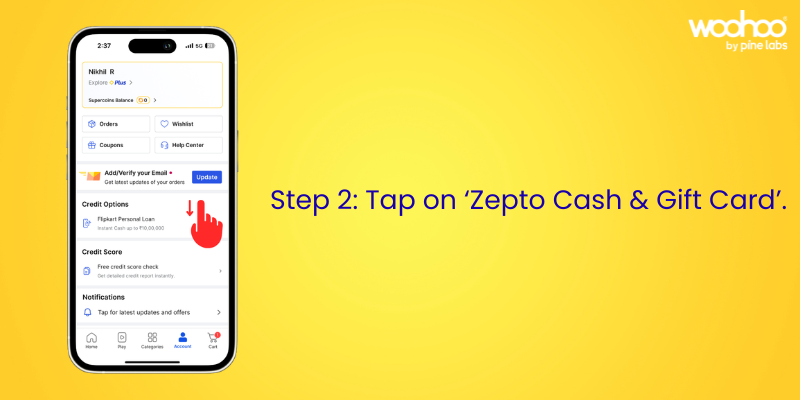
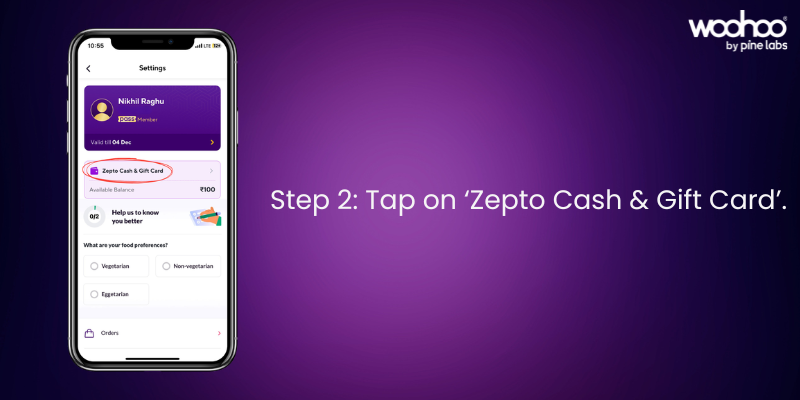
Step 2: Tap on ‘Zepto Cash & Gift Card’

In your profile section, select Zepto Cash & Gift Card to proceed.

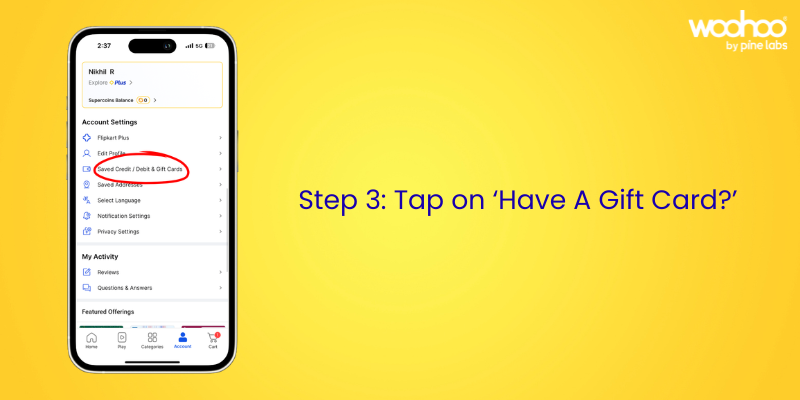
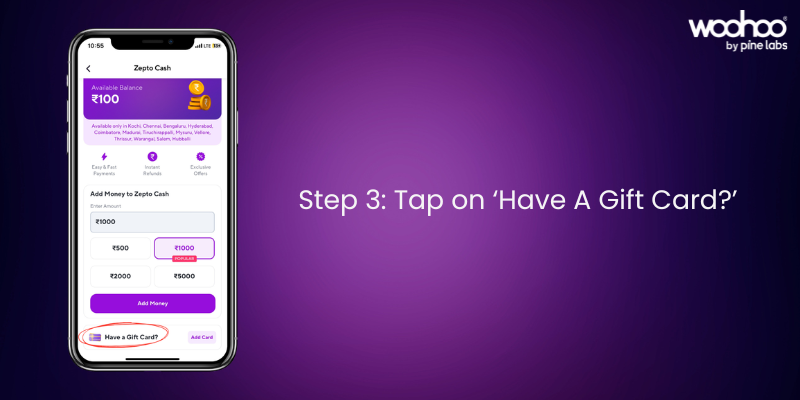
Step 3: Tap on ‘Have A Gift Card?’.

Choose the Have A Gift Card? option to enter your gift card details.

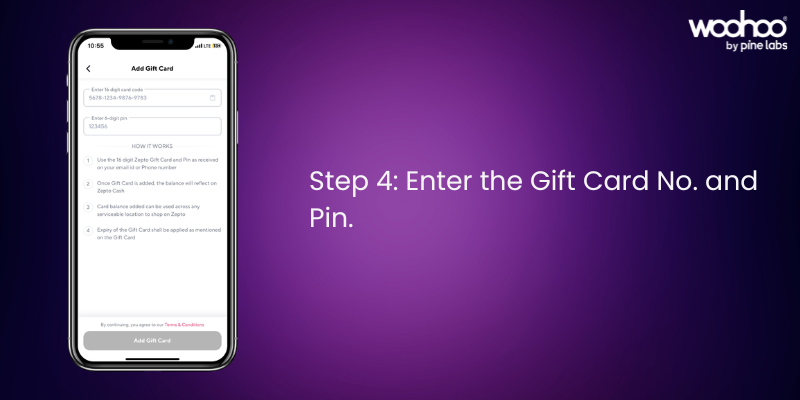
Step 4: Enter the Gift Card Number and PIN.

Locate your Gift Card Number and PIN from your email. Enter them carefully, and your balance will appear instantly in your Zepto account.

Woohoo! Your Zepto Gift Card is now ready to use.

Things to Keep in Mind

  • Your gift card balance will automatically apply at checkout.
  • If your order exceeds the balance, you can pay the remaining amount with another payment method.
  • You can check your balance anytime in the Zepto Cash & Gift Card section.
  • Gift cards are valid as per the terms mentioned at the time of purchase.

FAQs on Zepto Gift Card Redemption

Q: Where do I find my Zepto Gift Card details?

A: The Gift Card Number and PIN are sent via email after purchase.

Q: Can I use multiple gift cards on one account?

A: Yes, all balances will combine in your Zepto account.

Q: Can I transfer my gift card balance to another account?

A: No, once redeemed, the balance cannot be transferred.

Q: Where can I buy Zepto Gift Cards?

A: You can buy Zepto Gift Cards from Woohoo, India’s largest gift card store.

Why Buy Zepto Gift Cards from Woohoo

Buying Zepto Gift Cards from Woohoo is fast, convenient, and rewarding. You’ll get your gift card instantly and can use it right away for a smooth shopping experience.

Want to see the process in action? Watch our How to Redeem Zepto Gift Card video and make your first redemption even easier.

Make Shopping Easy with Zepto Gift Cards

Zepto Gift Cards are the perfect way to simplify grocery shopping and make everyday essentials more accessible. Whether you’re gifting or redeeming, the process is quick, easy, and rewarding. The gift cards can be used on ongoing offers on Zepto and can even be combined with Zepto coupons, giving you extra savings while making your shopping experience seamless and convenient.

Get your Zepto Gift Card today on Woohoo and enjoy an extra 2.5% OFF instantly.

FacebooktwitterlinkedinFacebooktwitterlinkedin

Valentine’s Week: What It Really Means for All of Us

Valentine Week Is Almost Here Valentine Week is just around the corner, bringing with it a celebration of love, togetherness, and heartfelt moments. From Rose Day and Chocolate Day to Propose Day and the much‑awaited Valentine’s Day, the week is filled with small occasions that make expressing love even more special. Whether you’re celebrating with a partner, spouse, or someone who holds a special place in your heart, Valentine Week is the perfect time to cherish relationships and create memories that truly matter.

Why Gifting Matters During Valentine Week

Gifting is more than just an exchange of presents. It’s a way to express emotions, show appreciation, and make your loved ones feel valued. A thoughtful gift reflects care, effort, and understanding helping you express your love in a meaningful way. During a week dedicated to celebrating love, the right gift can turn simple moments into unforgettable ones.

Move Beyond the Usual and Choose Smarter Gifting

Let’s face it, gifting isn’t always easy. Flowers and chocolates are sweet, but they can feel predictable. This Valentine Week, move beyond the usual and choose a gifting option that truly works every time: gift cards.

With Woohoo, you can explore 300+ brands ands across fashion, food, electronics, travel, and more, along with 1000+ exciting offers. You can even schedule your gift card to be delivered on the perfect day of Valentine Week. Gift cards give your Valentine the freedom to choose what they truly love.

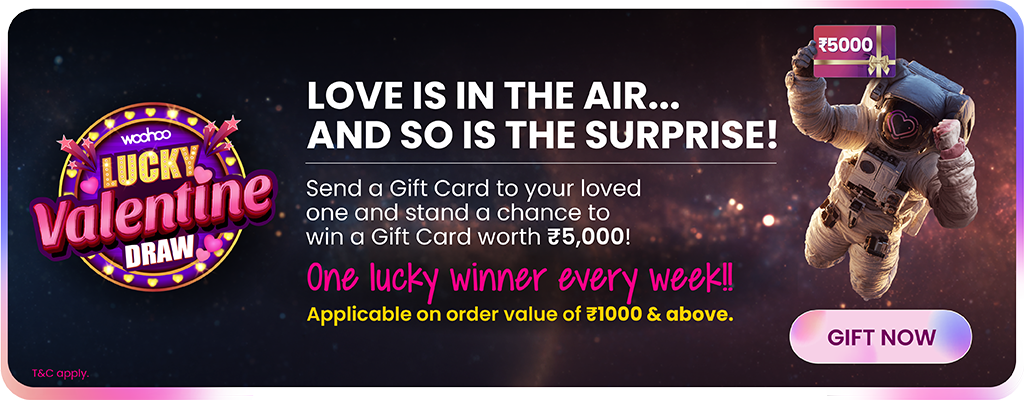
Enter Our Lucky Valentine Draw ❤️

Because thoughtful gifting deserves something extra, every gift card you send automatically enters you into our Lucky Valentine Draw.

You could win a ₹5,000 gift card every week until February 16. Imagine gifting your loved ones and winning something special for yourself too that’s a true Valentine win‑win.

Don’t Wait Start Gifting Today

Valentine Week is the perfect time to plan your gifting the right way. Choose thoughtfully, gift smarter, and stand a chance to win a ₹5,000 gift card.

Love is in the air, surprises are waiting, and Woohoo has everything you need this Valentine. Head over to Woohoo and make this Valentine Week truly unforgettable.

Visit our T&C page for Lucky Draw Terms and Conditions.

This Valentine’s, Choose Woohoo 💖

Choose love. Choose endless possibilities.

FacebooktwitterlinkedinFacebooktwitterlinkedin