How to Redeem BigBasket Gift Card – Complete Guide.

BigBasket is India’s largest online grocery supermarket, delivering fresh fruits and vegetables, daily staples, snacks, dairy, and household essentials to millions of homes. With same‑day and scheduled delivery across 30+ cities, it has become the go‑to platform for convenient, reliable grocery shopping.

A BigBasket Gift Card makes shopping even more rewarding. Whether you received one as a gift or bought it yourself from Woohoo, redeeming it takes less than a minute. This guide walks you through exactly how to do it.

How to Redeem BigBasket Gift Card – Step by Step.

Follow these 4 simple steps to redeem your BigBasket Gift Card and start saving:

Step 1: Log on to BigBasket and go to “My Account”.

Visit bigbasket web or open the BigBasket app. Sign in and tap the “My Account” icon at the top of the screen.

Step 2: Click on “BB Wallet”.

Inside your account menu, select “BB Wallet.” This is where you can view your wallet balance and add new gift cards.

Step 3: Click on “Redeem Gift Card”.

On the BB Wallet page, tap “Redeem Gift Card” to begin entering your card details.

Step 4: Enter your Gift Card Number and PIN.

Type in your BigBasket Gift Card Number and PIN exactly as shared in your Woohoo email or find them under “My Gift Cards” in your Woohoo account. Click “Redeem” to confirm. Your balance is credited to your BB Wallet instantly and is ready to use at checkout.

Done! You have successfully redeemed your Bigbasket E-Gift Card.
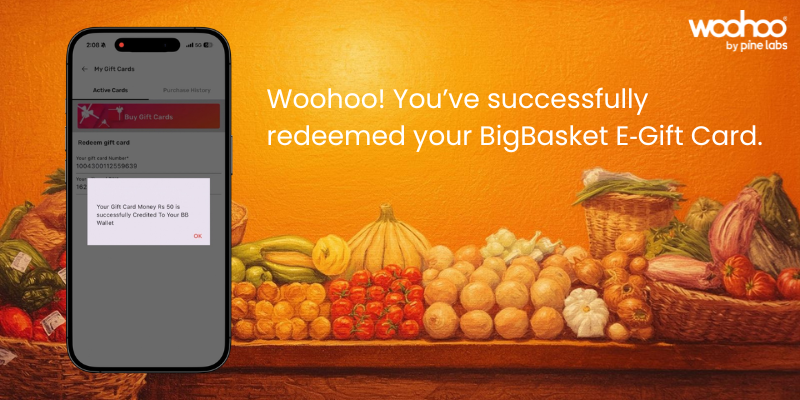
Your balance is now active in your BB Wallet and ready to use at checkout.

Where Can You Use a BigBasket Gift Card?

Your BB Wallet balance works across every major category on BigBasket:

  • Fresh Fruits & Vegetables – Farm‑fresh produce delivered daily
  • Grocery & Staples – Rice, dal, atta, oils, and pantry essentials
  • Snacks & Beverages – Chips, biscuits, juices, tea, and coffee
  • Dairy & Bakery – Milk, eggs, cheese, bread, and baked goods
  • Personal Care & Hygiene – Skincare, haircare, and grooming products
  • Household & Cleaning – Detergents, cleaners, and home supplies
  • Baby & Pet Care – Trusted products for family and pets

Things to Know Before You Redeem Your BigBasket Gift Card.

  • Gift card balance is credited directly to your BB Wallet and applied automatically at checkout.
  • If your order total is higher than your balance, pay the difference via UPI, credit/debit card, or net banking.
  • You can add multiple gift cards and all balances stack in your BB Wallet.
  • Once redeemed, the balance is non‑transferable between accounts.
  • BigBasket Gift Cards are valid for 1 year from the date of purchase.
  • Gift cards can be combined with BigBasket deals and sale offers for extra savings.

Frequently Asked Questions – BigBasket Gift Card.

Q: How do I redeem a BigBasket Gift Card?

A: Go to My Account on the BigBasket app or website, click “BB Wallet & Gift Card,” then “Redeem Gift Card,” and enter your Gift Card Number and PIN. Your balance is added to your BB Wallet instantly.

Q: Where do I find my BigBasket Gift Card Number and PIN?

A: Your Gift Card Number and PIN are sent to your registered email and mobile number via SMS immediately after purchase. You can also find them under “My Gift Cards” in your Woohoo account dashboard.

Q: Can I use a BigBasket Gift Card without a BigBasket account?

A: No. You need to be signed in to a BigBasket account to redeem and use a gift card.

Q: Can I use multiple BigBasket Gift Cards on one account?

A: Yes. You can add multiple gift cards, and the balances will combine in your BB Wallet.

Q: Does a BigBasket Gift Card work on all products?

A: It works on most products across all categories.

Q: What happens if my BigBasket order is cancelled after using a gift card?

A: The amount paid via gift card is refunded back to your BB Wallet balance.

Q: Can I use a BigBasket Gift Card during sales and offers?

A: Yes. Gift cards are valid during sale events and can be combined with bigbasket deals for maximum savings.

Q: Where can I buy a BigBasket Gift Card at a discount?

A: You can buy BigBasket Gift Cards on Woohoo, India’s largest gift card store, with an exclusive 4% instant discount and instant delivery.

Save More on BigBasket with Gift Cards.

Here’s a simple trick many shoppers use:

Buy a BigBasket Gift Card on Woohoo at an exclusive 4% discount before you shop, and you’ve already saved money before adding a single item to your cart.

Use that card at checkout on BigBasket alongside any ongoing sale or deals, and your effective savings stack up even further. It works for your weekly grocery run, monthly staples order, or that last‑minute delivery. Any time, every time.

Buy your BigBasket Gift Card on Woohoo today and start saving instantly.

Make Every Grocery Run More Affordable with BigBasket Gift Cards.

BigBasket Gift Cards are a smart, simple way to manage your monthly grocery budget. They’re instantly delivered, easy to use across thousands of products, and make a thoughtful gift for anyone who shops on BigBasket. Whether you’re stocking up your BB Wallet for the month or sending a surprise to someone who loves BigBasket, the process is simple, instant, and rewarding.

Get your BigBasket Gift Card on Woohoo and enjoy instant savings every time you shop.

FacebooktwitterlinkedinFacebooktwitterlinkedin

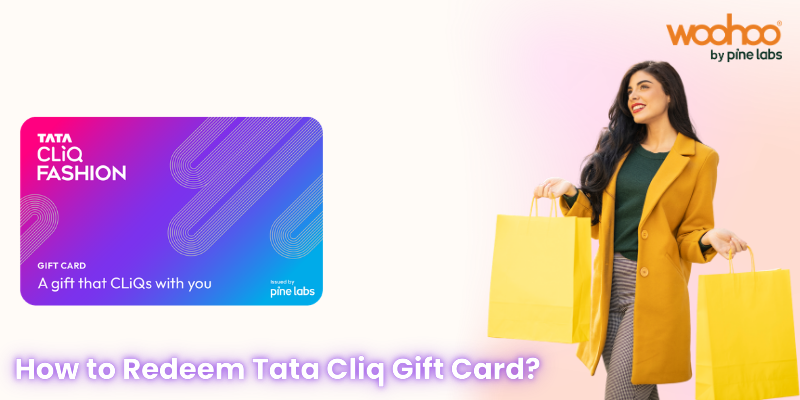
How to Use a TATA CLiQ Gift Card – Step‑by‑Step Guide

TATA CLiQ is one of India’s most trusted destinations for fashion, electronics, beauty, and home shopping. With its easy‑to‑use app and website, it brings together top brands and reliable service.

A TATA CLiQ Gift Card adds even more convenience. Whether you’ve received one as a gift or purchased it yourself, redeeming your card is quick and straightforward. Here’s how you can do it.

How to Redeem a TATA CLiQ Gift Card – Step by Step

Follow these 4 simple steps to add and use your TATA CLiQ Gift Card:

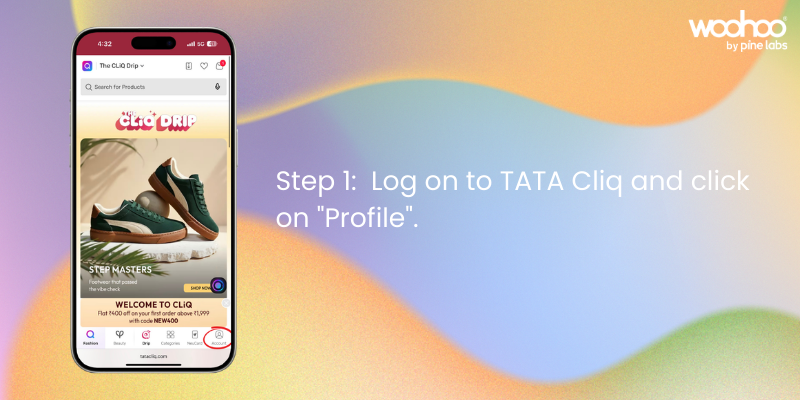
Step 1: Log on to TATA CLiQ and click on “Profile”.

Visit tatacliq.com or open the TATA CLiQ app. Sign in to your account and click on the “Profile” icon at the top right of the screen.
Step 2: Click on “Gift Card”.

Inside your Profile menu, select the “Gift Card” option. This is where you can manage balances and add new cards.

Step 3: Click on “Add it To Your Account”.

On the Gift Card page, tap or click “Add it To Your Account” to begin adding your new gift card.

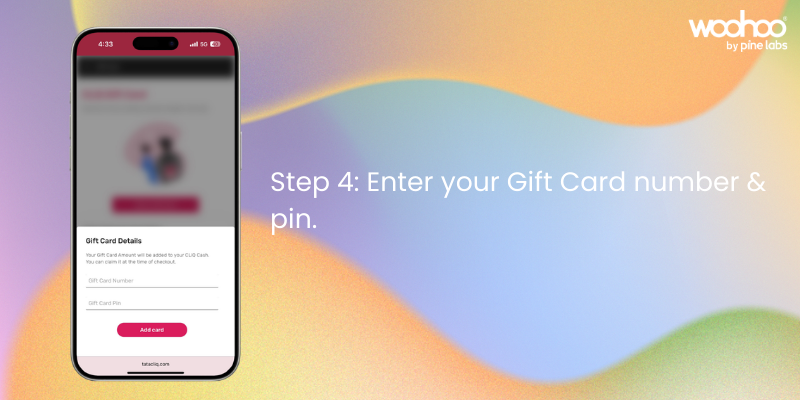
Step 4: Add Gift Card Number and PIN.

Enter your Gift Card Number and PIN exactly as shared in your Woohoo email or under “My Gift Cards” in your Woohoo account. Click “Add Card” to confirm. Your balance will reflect immediately and be ready to use at checkout.

That’s it! your TATA CLiQ Gift Card is now active and linked to your account!

Where to Use Your TATA CLiQ Gift Card Balance

Once added, your gift card balance can be used across all eligible categories on TATA CLiQ, including:

  • Fashion & Apparel – Clothing, footwear, and accessories from trusted brands
  • Electronics – Smartphones, laptops, audio, and gadgets
  • Beauty & Personal Care – Skincare, grooming, and wellness products
  • Home & Living – Furniture, décor, and kitchen essentials

Things to Know Before You Redeem

  • Your gift card balance applies automatically at checkout once added.
  • If your order total is higher than your balance, pay the difference using UPI, credit/debit card, or net banking.
  • Multiple gift cards can be added and balances stack in your account.
  • Gift card balance is non-transferable between accounts once redeemed.
  • TATA CLiQ Gift Cards are typically valid for 1 year from the date of purchase.
  • Gift cards can be combined with active TATA CLiQ sale offers and promotions for extra savings.

Frequently Asked Questions – TATA CLiQ Gift Card

Q: How do I find my TATA CLiQ Gift Card Number and PIN?

A: Your Gift Card Number and PIN are emailed to you instantly after purchase. You can also find them under “My Gift Cards” in your Woohoo account dashboard.

Q: Can I use a TATA CLiQ Gift Card without an account?

A: No, you need to be logged in to a TATA CLiQ account to add and redeem a gift card.

Q: Can I use multiple TATA CLiQ Gift Cards on a single order?

A: Yes. You can add multiple gift cards to your account and the combined balance will be available at checkout.

Q: Is a TATA CLiQ Gift Card valid on all products?

A: Gift cards are valid on most products across TATA CLiQ. Certain exclusions may apply during special promotions.

Q: What happens if my order is cancelled after using a gift card?

A: If your order is cancelled, the amount paid via gift card is refunded back to your TATA CLiQ Gift Card balance.

Q: Can I use a TATA CLiQ Gift Card during sale events?

A: Yes! Gift cards are valid during sale events, allowing you to combine discounted prices with your gift card balance.

Q: Where can I buy TATA CLiQ Gift Cards at a discount?
A: You can purchase TATA CLiQ Gift Cards on Woohoo at Flat 10.5% OFF, India’s largest gift card store with instant delivery.

Save More with Woohoo – Flat 10.5% OFF on TATA CLiQ Gift Cards

Here’s a smart shopper tip: before you buy anything on TATA CLiQ, load up on gift cards from Woohoo first.

When you purchase a TATA CLiQ E‑Gift Cards on Woohoo, you get a flat 10.5% instant discount, so a ₹1,000 gift card costs you just ₹895. Use that card on TATA CLiQ along with ongoing sales or promotions, and your effective savings go even higher.

It’s the easiest way to consistently spend less on everything you already love to buy. Buy TATA CLiQ Gift Card at 10.5% OFF on Woohoo.

TATA CLiQ Luxury Gift Cards

For premium and high‑end shopping, Woohoo also offers TATA CLiQ Luxury Gift Cards. These are designed specifically for CLiQ Luxury, giving you access to exclusive international labels, designer fashion, and luxury products. If you’re looking to shop or gift something truly special, the Luxury Gift Card is the perfect choice.

Make Shopping Easy with TATA CLiQ Gift Cards

TATA CLiQ Gift Cards are the perfect way to simplify shopping and make your favourite brands more accessible. Whether you’re gifting or redeeming, the process is quick, easy, and rewarding.

Get your TATA CLiQ Gift Card today on Woohoo and enjoy instant 10.5% OFF with this special offer.

FacebooktwitterlinkedinFacebooktwitterlinkedin

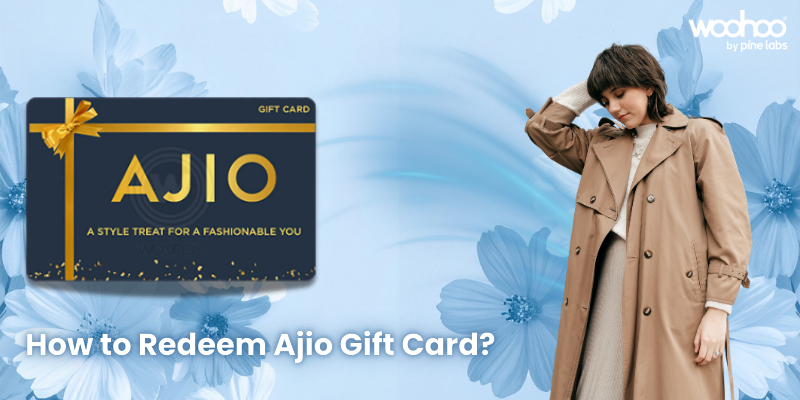
Step‑by‑Step: How to Use Ajio Gift Card?

Ajio has become one of India’s most stylish destinations for fashion and lifestyle shopping, offering everything from global brands to exclusive collections. With its easy‑to‑use app and website, Ajio makes shopping seamless and enjoyable.

A Ajio Gift Card adds even more convenience to the experience. Whether you’ve received one as a gift or purchased it yourself, redeeming your card is quick and straightforward. Here’s how you can do it.

Step‑by‑Step Redemption Process

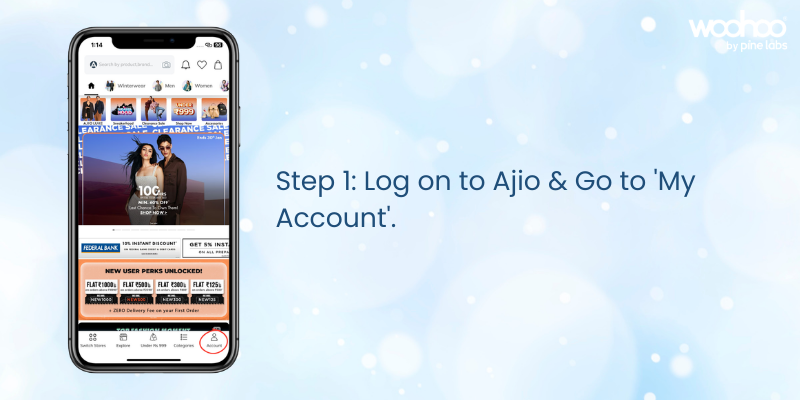
Log on to Ajio & Go to “My Account”.

Sign in to your Ajio account on the app or website and navigate to the “My Account” section.

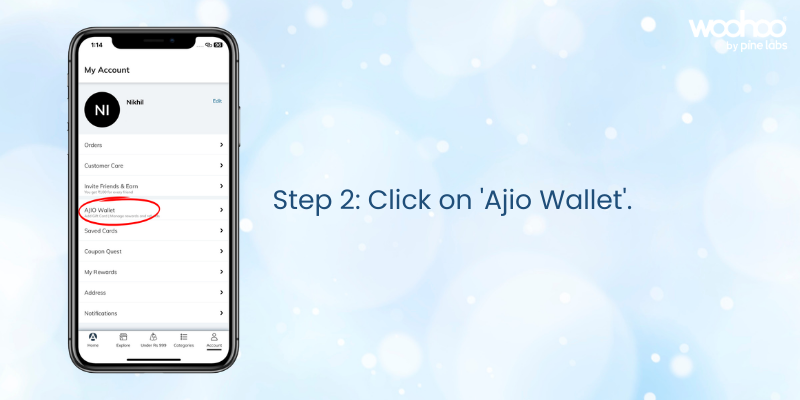
Click on “Ajio Wallet”.

Open your Ajio Wallet to view available payment and balance options.

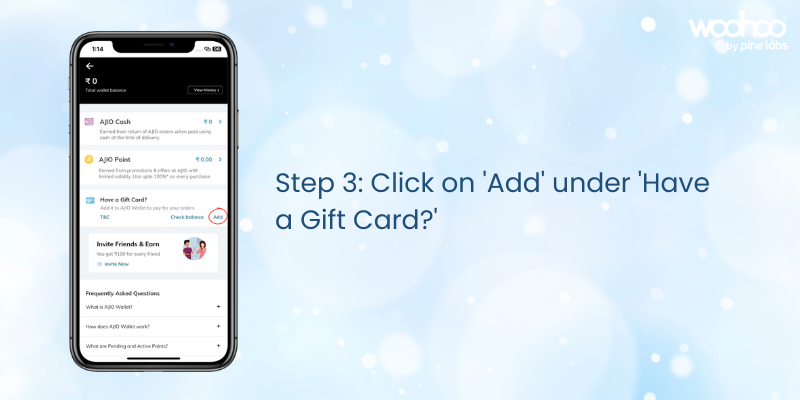
Click on “Add” under ‘Have a Gift Card?’.

Select the option to add a gift card to your wallet.

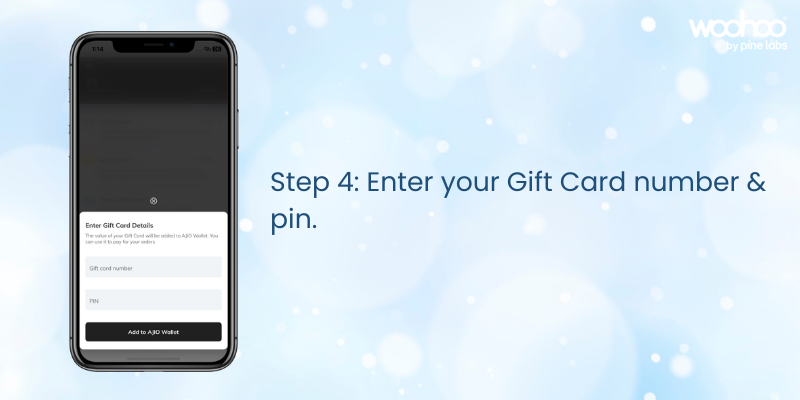
Enter your Gift Card number & PIN.

Type in your Ajio Gift Card details exactly as provided in your email or Woohoo account. Once applied, your balance will reflect instantly in your Ajio Wallet.

Your Ajio Gift Card is now ready to use at checkout for any purchase.

Things to Keep in Mind

  • Your gift card balance will automatically apply at checkout.
  • If your order exceeds the balance, pay the remaining amount with another payment method.
  • You can check your balance anytime in the “Ajio Wallet” section of your account.
  • Gift cards are valid for 1 year from the date of purchase.

FAQs on Ajio Gift Card Redemption

Q: Where do I find my Ajio Gift Card details?

A: The Gift Card Number and PIN are sent via email immediately after purchase or can be checked under “Gift Cards” in your Woohoo profile.

Q: Can I use multiple gift cards on one account?

A: Yes, balances from multiple cards will combine in your Ajio Wallet.

Q: Can I transfer my gift card balance to another account?

A: No, once redeemed, the balance cannot be transferred.

Q: Where can I buy Ajio Gift Cards?

A: You can buy Ajio Gift Cards from Woohoo, India’s largest gift card store.

Q: Can Ajio Gift Cards be used during sales or promotions?

A: Yes, Ajio Gift Cards can be combined with ongoing Ajio promo codes and offers for extra savings.

Q: What happens if my order is cancelled?

A: The refunded amount will be credited back to your Ajio Wallet balance linked to the gift card.

Ajio Offer – Save Extra with Woohoo

Woohoo brings you an exclusive deal on Ajio E‑Gift Cards. Get Flat 25% OFF instantly when you purchase through Woohoo. Even better, your Ajio Gift Card can be combined with ongoing Ajio coupon codes and offers, helping you unlock extra discounts and enjoy more value on every order.

Make Shopping Easy with Ajio Gift Cards

Ajio Gift Cards are the perfect way to simplify fashion shopping and make stylish essentials more accessible. Whether you’re gifting or redeeming, the process is quick, easy, and rewarding. Get your Ajio Gift Card today on Woohoo and enjoy instant 25% OFF with this special offer.

FacebooktwitterlinkedinFacebooktwitterlinkedin

How to Redeem Nykaa Gift Card – Step‑by‑Step Guide

Nykaa has become one of India’s most trusted beauty and lifestyle platforms, offering everything from skincare and makeup to fashion, wellness, and accessories. With reliable delivery, secure payments, and a wide product range, Nykaa makes shopping simple and convenient.

A Nykaa Gift Card adds even more ease to the experience. Whether you’ve received one as a gift or purchased it yourself, redeeming your card is straightforward.

Step‑by‑Step Redemption Process

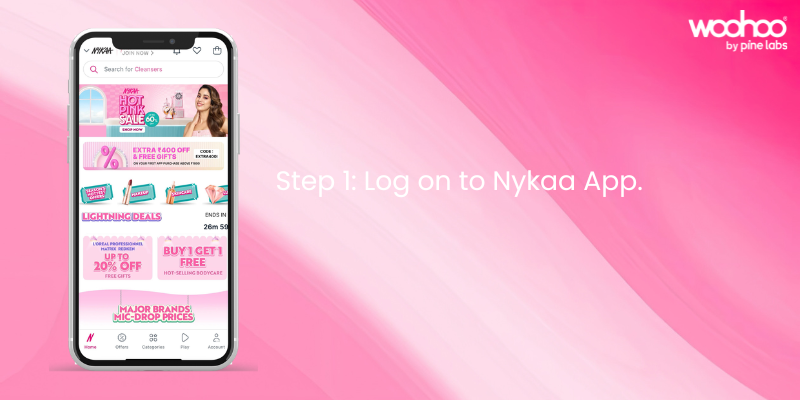
Step 1: Log on to Nykaa.

Sign in to your Nykaa account on the app or website.

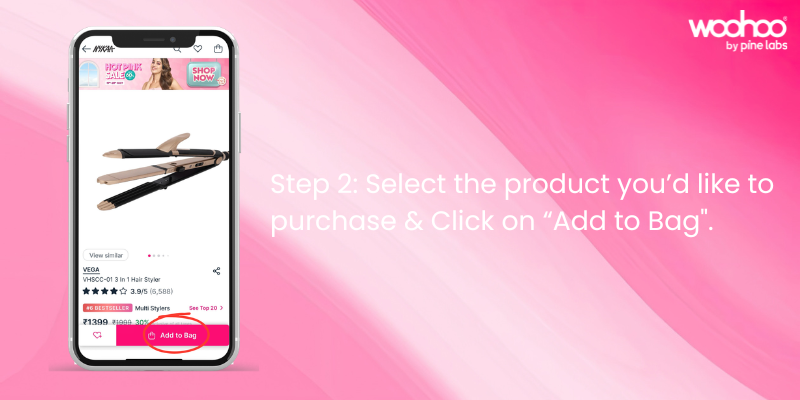
Step 2: Select the product you’d like to purchase.

Browse Nykaa’s catalog, add items to your cart, and click on “Proceed to Pay.”

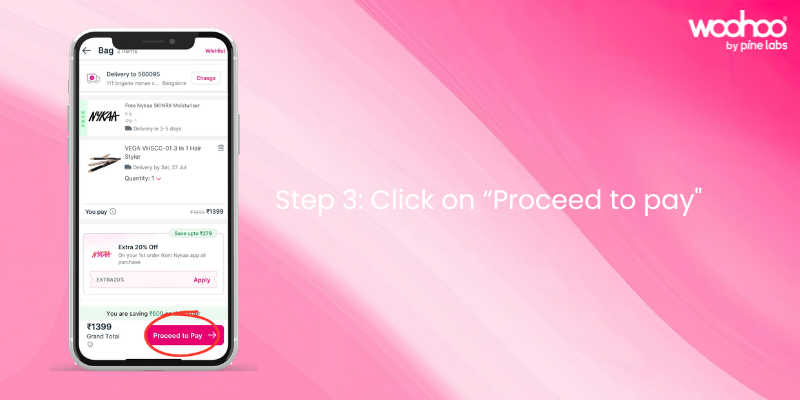
Step 3: Click on “Proceed to Pay”.

Confirm your cart and move to the payment page.

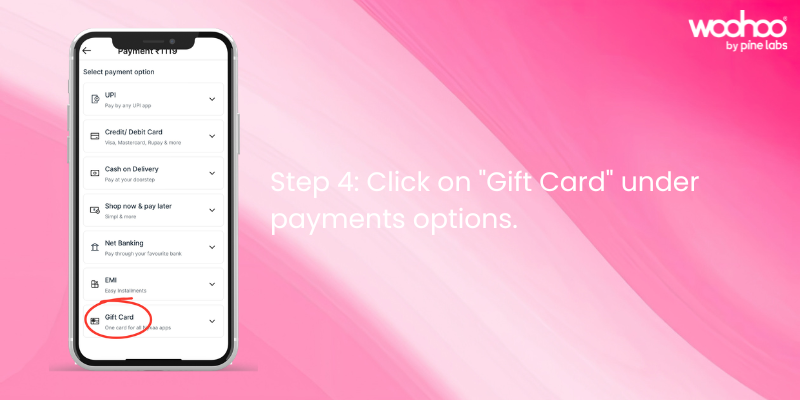
Step 4: Click on “Gift Card” under payment options.

At the checkout page, choose Gift Card as your payment method.

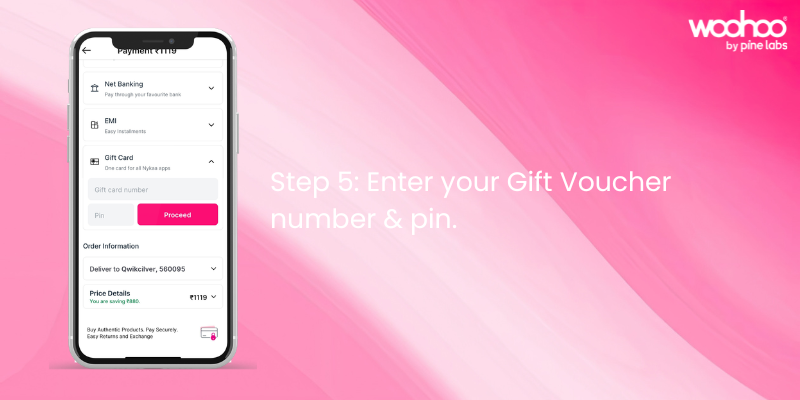
Step 5: Enter your Gift Card number & PIN.

Type in your Nykaa Gift Card number and PIN exactly as provided in your email or Woohoo account. Once applied, your balance will reflect instantly.

Your Nykaa Gift Card is now ready to use at checkout.

Things to Keep in Mind

  • Your gift card balance will automatically apply at checkout.
  • If your order exceeds the balance, pay the remaining amount with another payment method.
  • You can check your balance anytime in the “Gift Card” section of your account.
  • Gift cards are valid for 1 year from the date of purchase.

FAQs on Nykaa Gift Card Redemption

Q: Where do I find my Nykaa Gift Card details?

A: The Gift Card Number and PIN are sent via email immediately after purchase or can be checked under “Gift Cards” in your Woohoo profile.

Q: Can I use multiple gift cards on one account?

A: Yes, balances from multiple cards will combine in your Nykaa account.

Q: Can I transfer my gift card balance to another account?

A: No, once redeemed, the balance cannot be transferred.

Q: Where can I buy Nykaa Gift Cards?

A: You can buy Nykaa Gift Cards from Woohoo, India’s largest gift card store.

Nykaa Offer – Save Extra with Woohoo

Woohoo brings you an exclusive deal on Nykaa E‑Gift Cards. Get Flat 6.5% OFF instantly when you apply the promo code NYKAA65 at checkout. Even better, your Nykaa Gift Card can be combined with ongoing Nykaa offers and promo codes, helping you unlock extra discounts and enjoy more value on every order.

Why Choose Nykaa Gift Cards?

Nykaa Gift Cards are the perfect way to simplify shopping and make beauty, fashion, and lifestyle essentials more accessible. They are ideal for birthdays, anniversaries, festive gifting, or simply treating yourself. Whether you’re gifting or redeeming, the process is quick, easy, and rewarding.

Get your Nykaa Gift Card today on Woohoo and enjoy instant 6.5% OFF with promo code NYKAA65.

FacebooktwitterlinkedinFacebooktwitterlinkedin

How to Redeem JioMart Gift Card – Step‑by‑Step Guide.

JioMart has become one of India’s most trusted online shopping platforms, offering everything from groceries and household essentials to fashion, electronics, and lifestyle products. With reliable delivery, secure payments, and a wide product range, JioMart makes shopping simple and convenient.

A JioMart Gift Card adds even more ease to the experience. Whether you’ve received one as a gift or purchased it yourself, redeeming your card is straightforward. Here’s how you can do it.

Step‑by‑Step Redemption Process

Step 1: Log on to JioMart.

Sign in to your JioMart account on the app or website.

Step 2: Select the product you’d like to purchase & click on “Place Order”.

Browse JioMart’s catalog, add items to your cart, and proceed to checkout.

Step 3: Click on “Gift Card” under Redemption Options.

At the payment page, choose Gift Card as your redemption method.

Step 4: Enter your Gift Voucher Number & PIN.

Type in your JioMart Gift Card number and PIN exactly as provided in your email or Woohoo account. Once applied, your balance will reflect instantly.

Your JioMart Gift Card is now ready to use at checkout.

Things to Keep in Mind

  • Your gift card balance will automatically apply at checkout.
  • If your order exceeds the balance, pay the remaining amount with another payment method.
  • You can check your balance anytime in the “Gift Card” section of your account.
  • Gift cards are valid for 1 year from the date of purchase.

FAQs on JioMart Gift Card Redemption

Q: Where do I find my JioMart Gift Card details?

A: The Gift Card Number and PIN are sent via email immediately after purchase or you can also check under “Gift Cards” in your Woohoo profile.

Q: Can I use multiple gift cards on one account?

A: Yes, balances from multiple cards will combine in your JioMart account.

Q: Can I transfer my gift card balance to another account?

A: No, once redeemed, the balance cannot be transferred.

Q: Where can I buy JioMart Gift Cards?

A: You can buy JioMart Gift Cards from Woohoo, India’s largest gift card store.

JioMart Offer – Save Extra with Woohoo

Woohoo brings you an exclusive deal on JioMart E‑Gift Cards. Get Flat 4% OFF instantly when you apply the promo code JM4 at checkout. Even better, your JioMart Gift Card can be combined with ongoing JioMart promo codes and offers, helping you unlock extra discounts and enjoy more value on every order. It’s a simple way to make shopping smarter, more affordable, and completely hassle‑free.

Make Shopping Easy with JioMart Gift Cards

JioMart Gift Cards are the perfect way to simplify shopping and make everyday essentials more accessible. Whether you’re gifting or redeeming, the process is quick, easy, and rewarding. They can be used across categories like groceries, fashion, electronics, and household essentials, ensuring you save more while enjoying a seamless shopping experience.

Get your JioMart Gift Card today on Woohoo and enjoy instant 4% OFF with promo code JM4.

FacebooktwitterlinkedinFacebooktwitterlinkedin

How to Redeem Your Google Play Gift Code: Step‑by‑Step Guide

Google Play is the hub for apps, games, movies, books, and more on Android devices. With a Google Play Gift Code, you can instantly add balance to your account and enjoy premium content without needing a credit card. Whether you’ve received one as a gift or purchased it yourself, redeeming your google play code is quick and simple. Here’s how you can do it.

Step‑by‑Step Redemption Process

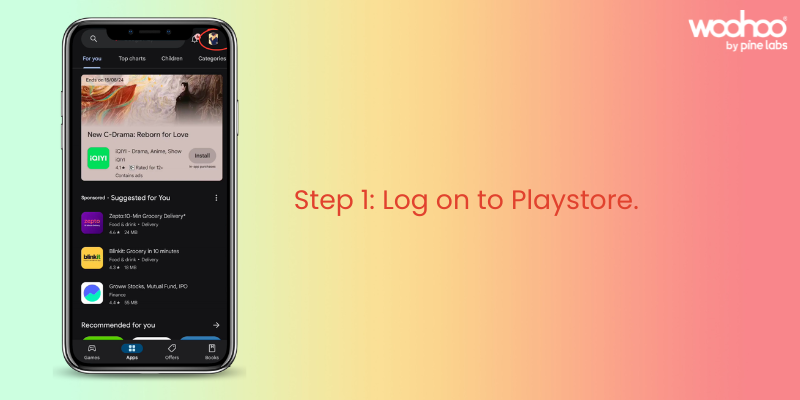
Step 1: Log on to Play Store.

Open the Google Play Store app on your Android device. Tap on your profile icon in the top‑right corner. Make sure you’re signed in to the correct Google account.

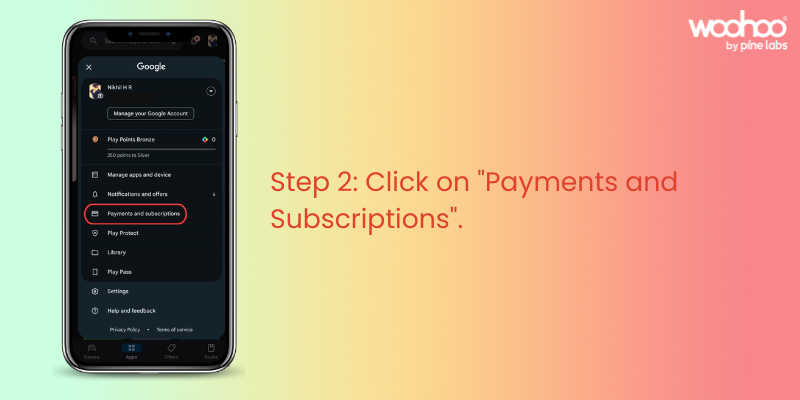
Step 2: Click on “Payments and Subscriptions.”

From the menu, select “Payments and Subscriptions.” This section lets you manage payment methods, subscriptions, and redeem codes.

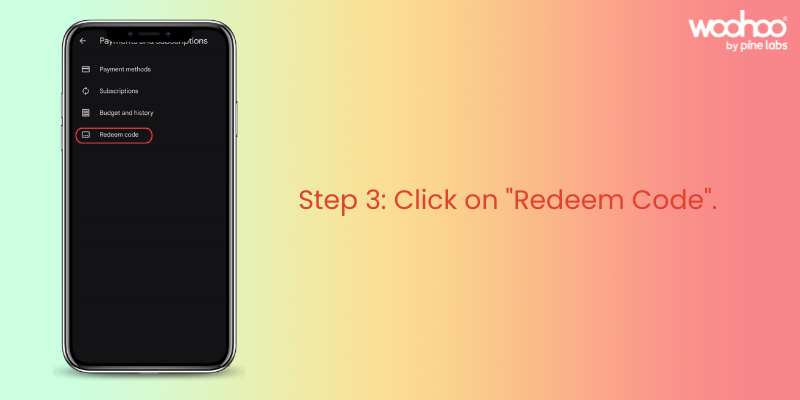
Step 3: Click on “Redeem Code.”

Inside “Payments and Subscriptions,” locate the “Redeem Code” option. Tap on it to proceed.

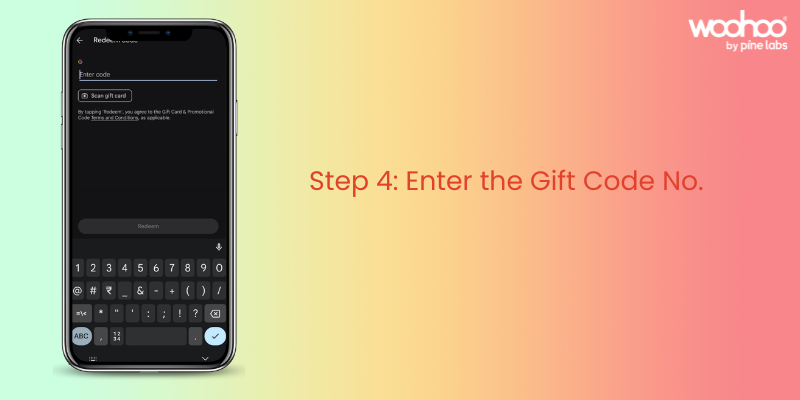
Step 4: Enter Your Google Play Gift Code.

Type in the Google Play Gift Code exactly as shown in your email or Woohoo account. Once entered, tap “Redeem” to apply the balance to your account. Your Google Play balance will be updated instantly.

Woohoo! Your Google Play Gift Code is now ready to use.

Things to Keep in Mind

  • Your gift code balance will automatically apply when you purchase apps, games, or other content.
  • If your order exceeds the balance, you can pay the remaining amount with another payment method.
  • You can check your balance anytime in the “Payments and Subscriptions” section of the Play Store.
  • Gift codes are valid as per the terms mentioned at the time of purchase.

FAQs on Google Play Gift Code Redemption

Q: Where do I find my Google Play Gift Code details?

A: The Gift Code is sent via email immediately after purchase. If you purchased through Woohoo, you can also log in to the Woohoo app or website under “Gift Cards” in My Profile to view your code and balance anytime.

Q: Can I use multiple gift codes on one account?

A: Yes, all balances will combine in your Google Play account.

Q: Can I transfer my gift code balance to another account?

A: No, once redeemed, the balance is tied to your Google account and cannot be transferred.

Q: Where can I buy Google Play Gift Codes?

A: You can buy Google Play Gift Codes instantly from Woohoo, India’s largest gift card store.

Woohoo Exclusive Offer

Buying Google Play Gift Codes from Woohoo is fast, convenient, and rewarding. You’ll get your code instantly and can use it right away for apps, games, movies, and more. Plus, Woohoo gives you 4.5% cashback in the form of Woohoo loyalty points. These points can be used to buy gift cards from 300+ brands on Woohoo from fashion and food to travel and lifestyle.

For gamers, this is especially valuable: you can use your Google Play Gift Code balance for in‑app purchases, upgrades, and premium content, while stacking Woohoo loyalty points for future savings across other categories.

Make Entertainment Easy with Google Play Gift Codes

Google Play Gift Codes are the perfect way to simplify digital purchases. Whether you’re gifting or redeeming, the process is quick, easy, and rewarding. Codes can be used on ongoing offers in the Play Store and combined with coupons, giving you extra savings while making your entertainment seamless and convenient.

Get your Google Play Gift Code today on Woohoo and enjoy instant balance plus 4.5% cashback loyalty points for even more rewards.

FacebooktwitterlinkedinFacebooktwitterlinkedin

How to Redeem Your Flipkart Gift Card: Step‑by‑Step Guide

Flipkart has become India’s go‑to destination for online shopping, offering everything from electronics and fashion to groceries and lifestyle essentials. With a smooth app and website experience, millions of customers rely on Flipkart for fast delivery, great deals, and a wide product range.

Now, with a Flipkart Gift Card, shopping becomes even more rewarding. Whether you’ve received one as a thoughtful gift or purchased it yourself, redeeming your card is quick and simple. Here’s how you can do it.

Step‑by‑Step Redemption Process

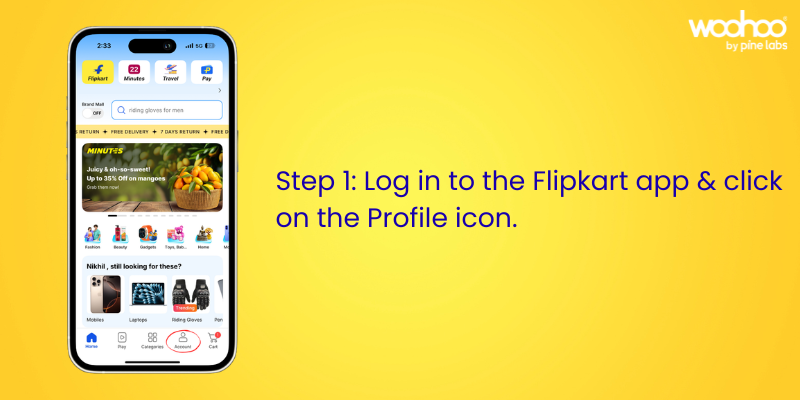
Step 1: Log on to Flipkart and open your Account.

Sign in to your Flipkart account. Tap on the profile icon at the bottom of the screen to access your account settings.

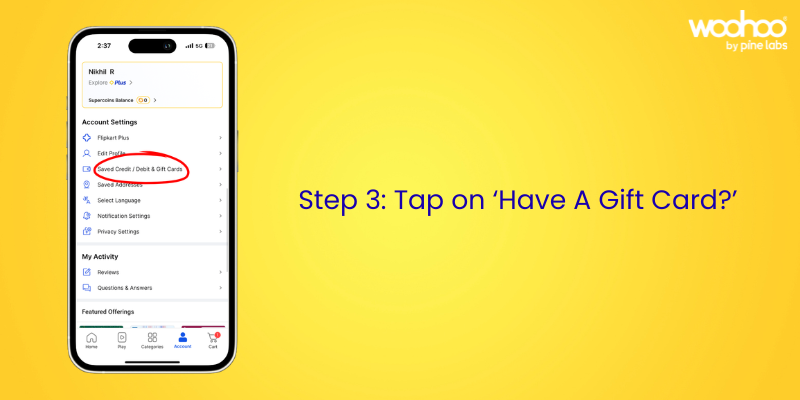
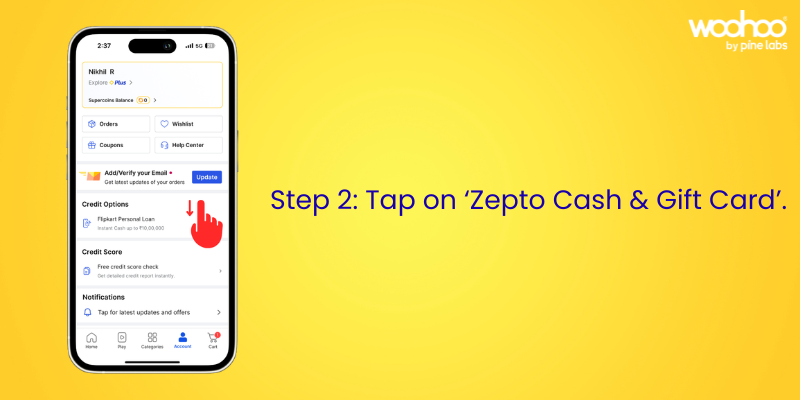
Step 2: Scroll down to “Saved Credit/Debit & Gift Cards.”

In the account section, scroll until you find the “Saved Credit/Debit & Gift Cards” option.

Step 3: Click on “Saved Credit/Debit & Gift Cards.”

Select this option to manage your saved payment methods and gift cards.

Step 4: Click on “Add Flipkart Gift Card.”

Choose “Add Flipkart Gift Card” to begin redeeming your card.

Step 5: Enter Your Flipkart Gift Card Number and PIN.

Type in your Flipkart Gift Card number and PIN exactly as shown in your email or Woohoo account. Click “Apply” to add the balance to your account. Your Flipkart Gift Card balance will now be available for use at checkout.

Woohoo! Your Flipkart Gift Card is ready to use.

Things to Keep in Mind

  • Your gift card balance will automatically apply at checkout.
  • If your order exceeds the balance, you can pay the remaining amount with another payment method.
  • You can check your balance anytime in the “Saved Credit/Debit & Gift Cards” section.
  • Gift cards are valid as per the terms mentioned at the time of purchase.

FAQs on Flipkart Gift Card Redemption

Q: Where do I find my Flipkart Gift Card details?

A: Your Flipkart Gift Card Number and PIN are sent via email immediately after purchase. If you purchased through Woohoo, you can also log in to the Woohoo app or website and check under “Gift Cards” in My Profile to view your Flipkart Gift Card details anytime. You can also check your current balance directly in the Woohoo app or website, making it easy to track how much you have left to spend.

Q: Can I use multiple gift cards on one account?

A: Yes, all balances will combine in your Flipkart account.

Q: Can I transfer my gift card balance to another account?

A: No, once redeemed, the balance cannot be transferred.

Q: Where can I buy Flipkart Gift Cards?

A: You can buy Flipkart Gift Cards from Woohoo, India’s largest gift card store.

Why Buy Flipkart Gift Cards from Woohoo

Buying Flipkart Gift Cards from Woohoo is fast, convenient, and rewarding. You’ll get your gift card instantly and can use it right away for a seamless shopping experience. Plus, when you pay with a Flipkart Gift Card, you can save extra! Woohoo gives you an additional 1.5% OFF on your purchase.

And here’s something special: Woohoo is offering an exclusive 80% OFF on Flipkart Gift Cards, giving you the perfect chance to try gift cards and enjoy massive savings on your next Flipkart order.

Make Shopping Easy with Flipkart Gift Cards

Flipkart Gift Cards are the perfect way to simplify shopping and make everyday essentials more accessible. Whether you’re gifting or redeeming, the process is quick, easy, and rewarding. The gift cards can be used on ongoing offers on Flipkart and can even be combined with Flipkart coupons, giving you extra savings while making your shopping experience seamless and convenient.

Get your Flipkart Gift Card today on Woohoo and enjoy instant savings plus exclusive offers.

FacebooktwitterlinkedinFacebooktwitterlinkedin